
Quick Summary

- Driver tracking enhances fleet operations by providing real-time data on driver performance and trip updates, improving accountability and decision-making.
- Advanced driver tracking systems go beyond basic location data, offering insights into driving behavior, delays, and route adherence for better management.
- The importance of driver tracking is increasing due to rising cost pressures, compliance requirements, and changing customer expectations in fleet management.
- Choosing the right driver tracking system involves looking for features like real-time tracking, driver behavior monitoring, and efficient route planning to optimize fleet performance.
Driver tracking is an effective way of improving fleet operations and increasing accountability. It also makes management more efficient. Learn its benefits, challenges, and more.
88% of fleets are using telematics to move beyond basic tracking. They are using telematics and other methods for driver tracking. Also, to stay up-to-date with fleet operations.
With the driver tracking system, they get data on live trip updates and driver performance. And track routes traveled. All this strengthens service quality, improves data flow, and speeds up decision-making. It is proving to be a practical method to amp up efficiency, safety, and service quality.
Read this blog to find out what driver tracking is, its benefits, and must-have features. So, you know what to look for when you look.
What is Driver Tracking?
Driver tracking is the process of monitoring a driver’s location and performance. It also includes tracking trip progress, route adherence, and driving behavior. Tracking is done through a combination of GPS trackers, telematics, mobile apps, and software. Fleet managers gain real-time visibility into daily operation and movement.
Unlike basic tracking, driver tracking measures accountability and performance. It identifies delays, route deviation, idling, overspeeding, and low productivity.
All this data helps with faster decisions and enabling safer driving habits. Also, ensuring stronger customer service.
Difference Between Basic Driver Tracking and Advanced Driver Tracking
Basic driver tracking shows locational data. Whereas advanced driver tracking measures driver behavior, delays, stoppages, and trip performance.
| Basic Driver Tracking | Advanced Driver Tracking |
| Shows live driver or vehicle location | Combines live tracking with driver intelligence |
| Provides route history and trip playback | Detects route deviations in real time |
| Requires manual calls for trip updates | Sends automated alerts and status updates |
| Limited visibility into delays or stoppages | Tracks delays, stoppages, and idle time |
| No driver behavior insights | Monitors speeding, braking, acceleration, and discipline |
| Basic reports with low actionability | Uses scorecards, trends, and performance analytics |
| Reactive fleet management | Enables proactive and data-led operations |
Why Does It Matter in 2026?
Driver tracking matters because fleet management is just about knowing location data. Businesses now want to control costs, meet compliance standards, and deliver faster. This level of performance can only be achieved with enhanced visibility. And, through deeper operational insights.
Fleets are running and operating in multiple cities, vendors, routes, and customer commitments. Manual methods like communicating over calls, managing spreadsheets, and late updates create inefficiencies. Tracking is solving this by giving operation teams live movement data. They are getting route adherence reports, trip progress, and driver performance insights. That too from a centralized platform.
Cost pressure is higher than ever before.
Fuel, maintenance, tolls, and labor/driver costs all impact fleet margins. Even the smallest inefficiency creates a large annual loss. Some common examples are
- Long engine idling during stoppages
- Route deviations that increase trip distance
- Unauthorized vehicle usage
- Harsh acceleration and overspeeding that reduce fuel efficiency
- Delays that increase turnaround time
Fleet managers tracking drivers will be able to detect these issues early on. They will have the opportunity to improve cost per trip and cost per kilometer.
Compliance Requirements are Expanding
Transport businesses are now facing stronger governance and documentation requirements. In India, AIS 140 has accelerated the adoption of GPS-enabled tracking. It has made it a mandate for vehicles to have panic button and emergency response systems.
Transport contractors and enterprises must implement:
- Digital trip logs
- Geofence-based attendance
- Route history reports
- Driver accountability records
- Proof of service movement
- Audit-ready operational data
Due to lack of tracking system, one must maintain these records manually. They will be slow and error prone.
Driver Safety and Fatigue are Major Priorities
Road safety is a business priority, not just a transport concern. Accidents lead to more downtime, insurance claims, legal complications, and brand damage.
Globally, many fleet operators have to follow Hours of Service (HOS). It limits excessive driving hours and enforces rest cycles. In countries where it is not a mandate, businesses track to monitor –
- Driving duration
- Halt time
- Shift cycles
- Night movement
- Fatigue risk indicators
- Repeated unsafe driving events
This helps reduce incident probability and supports safer fleet operations.
Customer Expectations Have Changed
Customers now expect accurate ETAs, live shipment visibility, and proactive communication. A delayed trip without updates can quickly become a complaint or lost account.
Driver tracking enables dispatch teams to:
- Share live status updates
- Predict delays early
- Reassign nearby vehicles when needed
- Improve first-response time
- Maintain stronger service SLAs
For logistics and delivery businesses, this directly impacts retention and reputation.

Driver Productivity Must Improve
Markets are facing driver shortages, and their retention is a challenge. Businesses cannot solely rely on hiring more staff. What they need is to increase output per driver through –
- Better route allocation
- Reduced idle time
- Faster loading and unloading cycles
- Lower empty-run distance
- Smarter dispatch planning
Tracking provides all the data needed to improve productivity without risking safety.
Multi-City Operations Need Centralized Control
As fleets scale across branches and regions, inconsistency becomes a common problem. One branch may perform well. Whereas another struggles with delays, misuse, or poor discipline.
Driver tracking helps leadership standardize operations using:
- Common KPIs
- Central dashboards
- Driver scorecards
- Region-wise reports
- Branch benchmarking
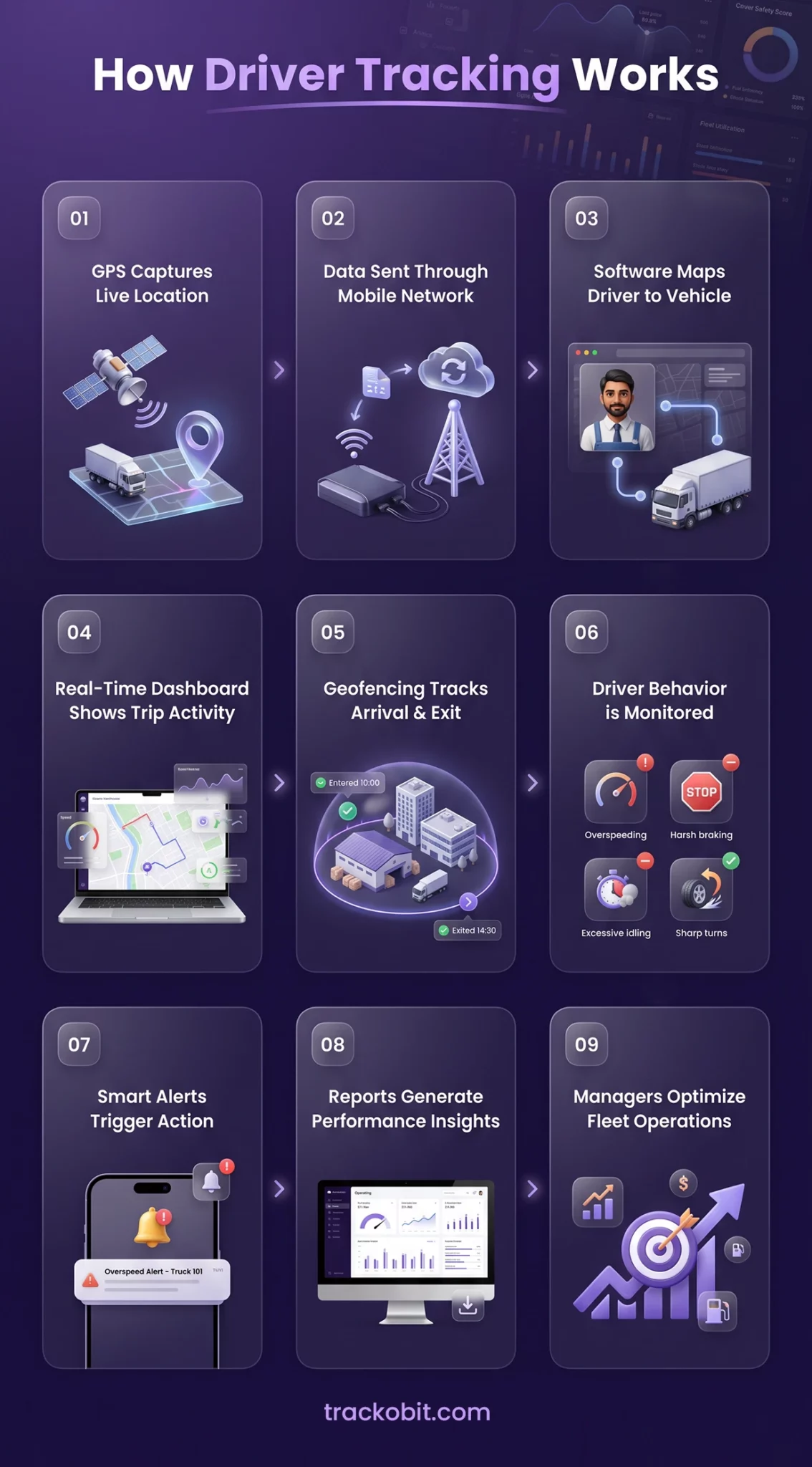
How Driver Tracking Works: Step-by-Step Guide
Real-time monitoring works best when technology is supported with a clear process. The right setup helps with gaining accurate visibility, faster decisions, and stronger accountability.
Here are the steps on how to create a scalable driver tracking.
Step 1: GPS Device Captures Live Location
A GPS tracking device installed in the vehicle receives satellite signals. It determines the vehicle’s exact location. The device continuously captures coordinates, speed, direction, and movement status during the trip.
Step 2: Data Is Sent Through Mobile Network
The tracking device uses GSM, 4G, or LTE connectivity to transmit live data to the cloud server. This allows fleet managers to access location and trip updates without delay.
Step 3: Software Maps Driver to Vehicle
Inside the platform, the assigned driver is linked to the vehicle. This ensures every trip, movement pattern, and driving event is recorded. That too against the correct driver for reporting and accountability.
Step 4: Real-Time Dashboard Displays Trip Activity
Fleet managers can view all active vehicles on a live dashboard. The system displays:
- Driver location
- Trip status
- Route followed
- Planned ETA
- Delays
- Idle vehicles
- Stop duration
This gives operations teams complete trip visibility.
Step 5: Geofencing Tracks Arrival and Exit
Virtual geofences are created around warehouses, depots, customer sites, and delivery points. When a vehicle enters or exits these locations, the system automatically records timestamps.
This helps measure turnaround time and proof of service movement.
Step 6: Driver Behavior Is Monitored
Advanced driver tracking systems use telematics inputs to monitor driving patterns such as:
- Overspeeding
- Harsh braking
- Sudden acceleration
- Excessive idling
- Sharp turns
Continuous driving duration is also monitored. When combined, these help improve safety and fuel efficiency.
Step 7: Smart Alerts Trigger Instant Action
When exceptions occur, automated alerts are sent to managers. Examples include:
- Route deviation
- Long idle time
- Trip delay
- Overspeed event
- Unauthorized stoppage
- Vehicle offline
This helps teams respond quickly before issues escalate.
Step 8: Reports Generate Performance Insights
The system converts raw tracking data into reports and dashboards such as:
- Driver scorecards
- Trip completion rate
- On-time performance
- Fuel usage trends
- Utilization reports
- Branch-wise productivity
These insights support better operational decisions.
Step 9: Managers Optimize Fleet Operations
Using tracking data, fleet managers can improve:
- Route planning
- Driver coaching
- Dispatch speed
- Fuel control
- SLA performance
- Vehicle utilization
Platforms like TrackoBit help bring all these functions into one fleet management ecosystem.
How Driver Tracking Works
What are the 6 Benefits of Driver Tracking for Fleet Businesses?
Benefits of tracking are lower empty miles and reduced idling time. It also ensures better asset utilization. Here are some of the benefit
1. Lower Empty Miles and Route Leakages
Fleet loses money when vehicles travel extra kilometers. This could be caused by route deviation, poor dispatch planning, and unauthorized movement. But system compares planned route vs actual travel route. It also identifies repeated leakage zones and reduces no-revenue distance. Also improves cost per trip and asset utilization.
2. Reduced Idle Time and Better Vehicle Utilization
Vehicles remain stationary when there is
- Loading delay
- Unscheduled breaks
- Queue time
- Poor coordination
But monitoring measures engine idling time, stop duration and TAT delays. This helps fleet increase their active running time and improve trips per vehicle.
3. Stronger Driver Accountability with Data
When supervising manually, there will be disputes over delays, stoppages, and trip completion. Monitoring creates timestamped records of movement, halt time, and arrival logs.
Fleet managers will fairly evaluate performance and improve discipline. They will do it on the basis of facts not assumptions.
4. Improved SLA Performance ad Customer Retention
Late arrivals and uncertain ETAs damage customer trust in the brand. The monitoring system offers live trip updates, predicted delays, and trip progress visibility.
Businesses with its help will respond faster. They increase on-time delivery percentages and protect customer accounts.
5. Lower Safety Risk and Incident Exposure
With driver behavior monitoring software, detect events like harsh braking and overspeeding. All these vents increase accident probability. But the tracking system detects these anomalies in real time.
With the data gathered, driver coaching can help. This will also reduce incident frequency and lower claim-related business risk.
6. Smarter Multi-Branch Fleet Management
As fleets expand, branch performance often becomes inconsistent. Driver tracking provides centralized dashboards with region-wise KPIs. It also has driver scorecards, utilization trends, and delay analysis.
This helps leadership benchmark branches, standardize operations, and scale with control.
What are the Driver Tracking Challenges and How to Solve Them?
Lack of monitoring leads to poor GPS accuracy, driver resistance, and too much data. Thus, reducing the value of the solution. It is vital that they address time, location data, and inadequate operational data. Poor implementation of tracking causes weak processes, limited adoption, and ROI. Listed below are some of the challenges and how they could be solved.
Poor GPS Accuracy and Network Gaps
The quality of monitoring depends on hardware strength, satellite visibility, and network coverage. Dense urban areas, basements, tunnels, and highways have no network zones. Due to this there is a delay in data packets and updates.
How to solve it-
Use automotive-grade GPS devices and multi-network SIMS. Go for systems that offer offline tracking. They collect data packets and sync once the connectivity is restored. Because of this, no data is lost.
Driver Resistance and Privacy Concerns
It is common for drivers to feel that monitoring is for surveillance or penalty management. Because of this, they push back on adoption or attempt to disable devices.
How to solve it –
Tell them that the system is a safety and efficient tool. Explain that the system will benefit them as well. For example, fair trip records, faster roadside support, and transparent performance reviews.
Too much Data, No Clear Insights
Lots of fleet management software give large volumes of trip logs, history and alerts. Without proper filters, managers will struggle to identify what needs immediate action.
A SambaSafety’s 2025 Telematics Report says, 70% of fleets use two or more device types to manage safety. With nearly 40% adding devices next year, the volume and complexity of data will continue to grow.
How to solve it –
Use dashboards that reflect insights in an easy-to-understand manner. Driver performance reports, daily summaries and other data. They are presented with proper charts and diagrams.
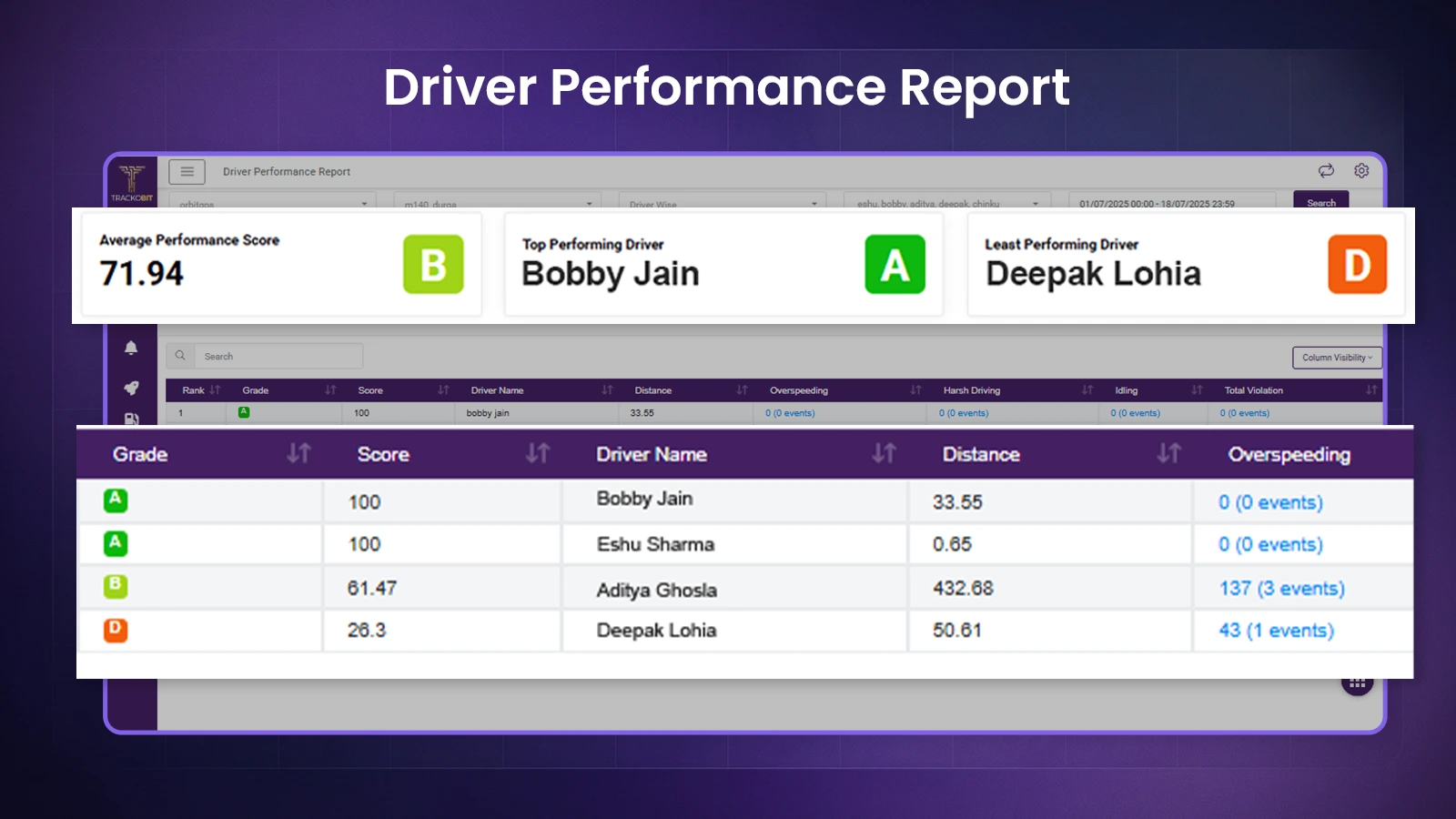
TrackoBit’s Driver Performance Report Identifies Top Performers
Excessive Alerts and Alert Fatigue
If every minor event generates notifications and alerts. Managers will soon start ignoring them. Chances are that important alerts might also be missed.
How to solve it –
Configure only business-critical alerts such as overspeeding, long idling and route deviation. Also, trip delays, panic events, and offline devices. Set escalation rules by severity.
Incomplete Driver Identification
Many fleet management software does not properly match drivers to vehicles and trips. This weakens accountability and makes driver-wise reporting unreliable.
How to solve it –
Go for telematics providers that have driver management modules as well. It ensures that driver documentation, identification, and operational are properly matched and managed. Some use authentication methods like mobile login or RFID. They do so to map drivers before the trip begins.
No Operational Follow Through
Many businesses install tracking systems but continue running operations through calls and spreadsheets. As a result, data is collected but not used.
How to solve it –
Integrate tracking data into dispatch, customer support, route planning, and weekly performance reviews. Make location data part of daily decision-making.
What Are the Types of Driver Tracking Systems and Which One Does Your Fleet Need?
There are multiple types of systems- GPS hardware-based, telematics-based, or mobile app based. But the need for every fleet is different, and so should be the tracking model. Here are some of the different types of systems to choose from.
GPS Hardware Based Tracking Systems
These system uses dedicated GPS trackers that are installed in the vehicles. They capture data like live location, ignition status, stoppages, and trip movement. This method is used in trucks, buses, logistics fleet, and commercial transport operations. They are reliable and have stronger control.
Best for:
- Logistics fleets
- Long-haul transport
- Heavy commercial vehicles
- Multi-city operations
Telematics Based Driver Monitoring Systems
Telematics system combines GPS with OBD and sensors. With it, it monitors vehicle health and driver behavior. It flags harsh braking, overspeeding and acceleration patterns. This is good for improving accountability and preventive maintenance planning.
Best For:
- Fleets focused on safety
- Fuel-sensitive operations
- Performance-driven transport companies
Mobile App Based Driver Tracking Systems
These apps use smartphone GPS instead of a dedicated vehicle tracker. Drivers have to log into the app before the trip begins. Then their movement starts getting tracked along with attendance and task completion. This is ideal for fast deployment and easier onboarding. Also, it reduces hardware dependency and cost.
Best For:
- Field service teams
- Sales fleets
- Temporary drivers
- Last-mile delivery teams
Video Telematics Systems
Video telematics combines GPS tracking and AI-Dashcams to visually record events. Through ADAS and DMS, it captures road facing and in-cabin events. They are linked to driver behavior. It is good for reducing accident disputes, catching fatigue, and improving coaching.
Best For:
- Safety-first fleets
- School transport
- Passenger transport
- High-risk cargo fleets
Route and Dispatch Integrated System
These platforms combine live monitoring with route planning. Also, dynamic dispatching, ETA prediction, and trip allocation. Improves on-time delivery rates and lowers empty-run distance.
Best For:
- Delivery fleets
- E-commerce logistics
- Hyperlocal operations
- Multi-drop transport models
Full Fleet Management Platforms
There are systems that combine tracking, telematics, fuel monitoring, and behavior monitoring. All the data is centralized. This eliminates tool fragmentation and improves decision-making at a scale. Fleet management software providers like TrackoBit helps in managing drivers, vehicles, routes and operation from one ecosystem.
Best For:
- Growing fleets
- Enterprise mobility
- Multi-branch operations
- Businesses needing centralized control
How to Choose the Best Driver Tracking Software? 7 Must have Features to Look For
When selecting a driver tracking system, it must have reports, app and tracking. Covering the basics to advanced management. It should act as a connection between managers, drivers, and operations. Here are the 7 must have features.
1. Real-time Accurate Tracking
A reliable platform provides 99.98% accurate location data. Halts and trip progress details also get shared with minimum delay. Because the lack of it weakens trip planning and customer communication.
2. Driver App for On-Ground Execution
Tracking should not stay limited to the manager’s dashboard. Drivers also need a dedicated app to manage daily operations.
A driver app should enable:
- Trip acceptance and trip updates
- Attendance marking
- Leave and shift visibility
- Expense uploads with receipts
- Navigation support
- Proof of delivery uploads
- Vehicle inspection checklists
TrackoBit’s Driver App communicates information like trip allocated, status, announcements, and more. It even helps with markin attendance, log expenses, and DVIR.
3. Driver Behavior Monitoring
The best platforms should monitor how they operate vehicles. It should be limited to tracking their locations only. Unsafe behavior directly impacts fuel cost, maintenance, and accident risk.
Trackable metrics should include:
- Overspeeding
- Harsh braking
- Sudden acceleration
- Excessive idling
- Route non-compliance
TrackoBit provides driver behavior performance insights, scorecard, and reports for safer fleet operations.
4. Smart Alerts and Exception Management
Fleet managers should not have to manually monitor screens all day. The software must automatically flag operational exceptions in real time.
Must-have alerts include:
- Route deviation
- Long stoppage
- Delayed trip
- Unauthorized movement
- Overspeeding
- Device offline
TrackoBit supports multiple configurable event alerts for proactive fleet control. It is a white label and offers 50+ alerts to choose from.
5. Efficient Route Planning
For logistics fleets, tracking software should support smarter trip planning and dispatch execution. A route planning feature helps plan routes, assign trips faster, and reduce empty runs.
Route planning solution helps manage:
- Predefined route creation for regular lanes
- Multi-stop trip planning
- Trip allocation to nearest or available vehicles
- Planned vs actual route tracking
- ETA visibility based on trip progress
- Dispatch scheduling by shift or load type
- Route deviation alerts
- Better load and vehicle utilization
- Faster turnaround planning
6. Reports, Analytics, and Driver Scorecards
Raw movement data has limited value unless converted into decision-ready reports.
Look for:
- Driver productivity reports
- Idle time analysis
- On-time trip performance
- Safety trends
- Utilization dashboards
- Branch-wise comparisons
TrackoBit provides analytics that help businesses convert fleet data into measurable action. Some examples are trip summary, fuel, driver management and BRAG.
7. Driver Management System
The best driver tracking software should help businesses manage them as operational assets. They are not just vehicle users. A strong driver management system centralizes records and compliance documents. Also helps with attendance, trip history, and performance data.
TrackoBit offers dedicated driver management capabilities. It teams control workforce operations with higher visibility and lower manual effort. This includes:
- Centralized driver profiles
- License, permit, and document expiry tracking
- Geo-tagged attendance records
- Driver-wise trip allocation history
- Expense and reimbursement visibility
- Driver performance monitoring
- Task and shift management
- Real-time driver availability status
How TrackoBit Helps You Track Drivers Smartly
TrackoBit helps fleets move beyond basic tracking with one platform. It does through driver visibility and execution. Track drivers in real time, assign trips through the TB Driver App, and manage driver records. Also, monitor behavior, reduce idle time, and improve dispatch control from one dashboard.
Built for logistics and transport fleets, TrackoBit helps reduce delays. Improve safety, raise accountability, and scale operations with confidence. TrackoBit also offers a fuel cost calculator to help you estimate fuel expenses based on fuel price, vehicle type, and distance.
Book a free demo and see how smarter management improves fleet performance.

Frequently Asked Questions
-
What is the difference between GPS tracking and driver tracking?
GPS tracking shows vehicle location, speed, and route history. Driver tracking goes further by monitoring driver behavior, trip punctuality, and route discipline. Platforms like TrackoBit combine both for complete fleet visibility and control.
-
How does driver tracking improve safety?
Driver tracking improves safety by detecting overspeeding, harsh braking, and sudden acceleration. Managers can coach drivers using real data and reduce accident risk. TrackoBit also supports behavior monitoring for safer operations.
-
How much does driver tracking cost?
The cost depends on fleet size and hardware type. Integration capacity and support need also matter. Basic plans cost less, while advanced systems include analytics and driver apps. TrackoBit offers flexible pricing plans. They are according to the needs of the businesses. Businesses should evaluate ROI, not only price, before selecting a platform.
-
Can I track drivers using mobile apps?
Yes, businesses can track drivers using mobile apps with GPS and mobile data. Driver apps also support trip updates, attendance, navigation, and proof of delivery. TrackoBit offers the TB Driver App for field execution.
-
What industries use driver tracking?
Driver tracking is used in logistics, transport, delivery, school buses, and rental fleets. Many businesses benefit from it. They get better visibility, punctuality, safety, and operational control through fleet tracking systems.
-
What is AIS 140 and how does it relate to driver tracking?
AIS 140 is an Indian standard for vehicle tracking and emergency response systems. It requires approved GPS devices and panic alerts. Also, live connectivity is a must in many transport categories. Thus, making it highly relevant for regulated fleet tracking.

Tithi Agarwal is an established content marketing specialist with years of experience in Telematics and the SaaS domain. With a strong background in literature and industrial expertise in technical wr... Read More


Related Blog
Fleet Management Requirements: The Complete Guide for 2026
Every wondered what exactly fleet management requirements are? Or, why do they matter? This guide helps you understand in detail.
7 Fleet Management Best Practices Every Fleet Manager Needs
Learn 7 fleet management best practices to improve safety, vehicle utilization, efficiency, and fleet performance in 2026.
What Are the Roles and Responsibilities of a Fleet Owner?
Behind every well-run fleet is a fleet owner juggling tasks like vehicle maintenance and driver management without letting anything fall…
What Is Fleet Intelligence? TrackoBit Goes Beyond GPS Tracking
Fleet intelligence is the layer of trustworthy data, driver-level accountability, and consistent identity that sits above GPS tracking. It turns…


Your inbox awaits a welcome email. Stay tuned for the latest blog updates & expert insights.
"While you're here, dive into some more reads or grab quick bites from our social platforms!"Stay Updated on tech, telematics and mobility. Don't miss out on the latest in the industry.