
In December, TrackoBit shipped a set of practical updates designed to fix real operational gaps.
The focus was clear: stronger delivery verification, better visibility into device movement, and smoother day-to-day workflows. From geo-tagged Proof of Delivery to a more accountable Device Inventory module, these changes were built to reduce guesswork and bring more clarity to fleet operations.
Major Updates in TrackoBit’s Web App for December 2025
New Feature 1 – Geo-tagged POD Images
POD images are now geo-tagged.
When a driver uploads a POD image, the system automatically captures latitude and longitude, address, date, and time with no manual input required. This information is visible on both the mobile app and the web dashboard.
Why it matters:
- Confirms POD was uploaded from the actual delivery location
- Helps identify fake or remotely uploaded PODs
- Improves delivery verification and audit accuracy
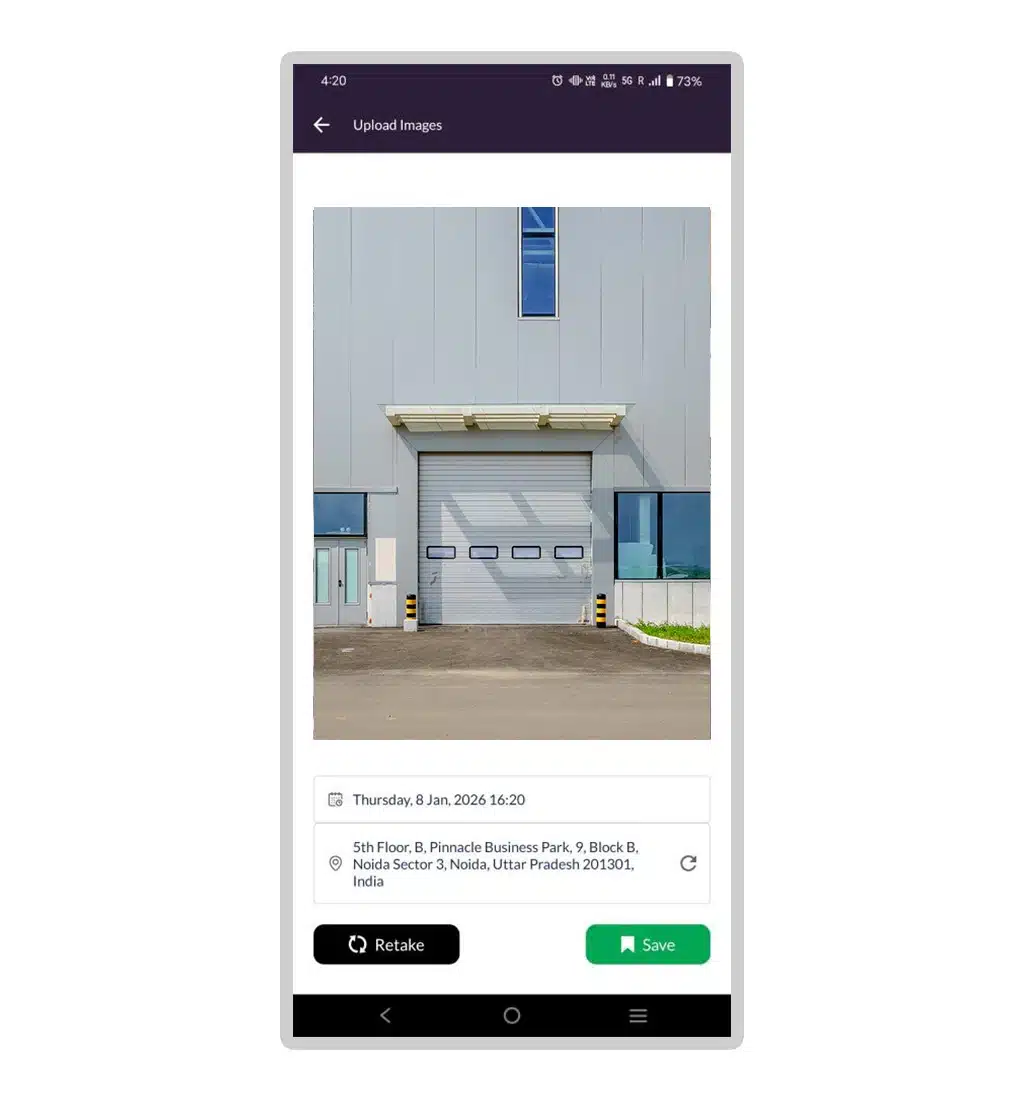
Geotagged POD capture real-time location, date and time
Feature Update 2 – Device Inventory
Earlier, the inventory module only showed a basic list of devices. Once a device was used, it disappeared from inventory with no status or technician-level visibility.
What’s changed now
1. Inventory can be assigned to technicians
Devices from inventory can now be allocated directly to a technician. Once assigned, each technician can view the inventory linked to them, ensuring clear ownership and accountability of devices at every stage of the device lifecycle.
2. Inventory status is now visible
Each device shows a clear status – whether it is in stock, in use, assigned to a technician, and the date it was used. Devices no longer disappear when used; their status updates instead.
3. A summary table is now available
It shows total inventory, devices in stock, devices in use, and technician-wise allocation. Managers get a clear snapshot without checking individual devices.
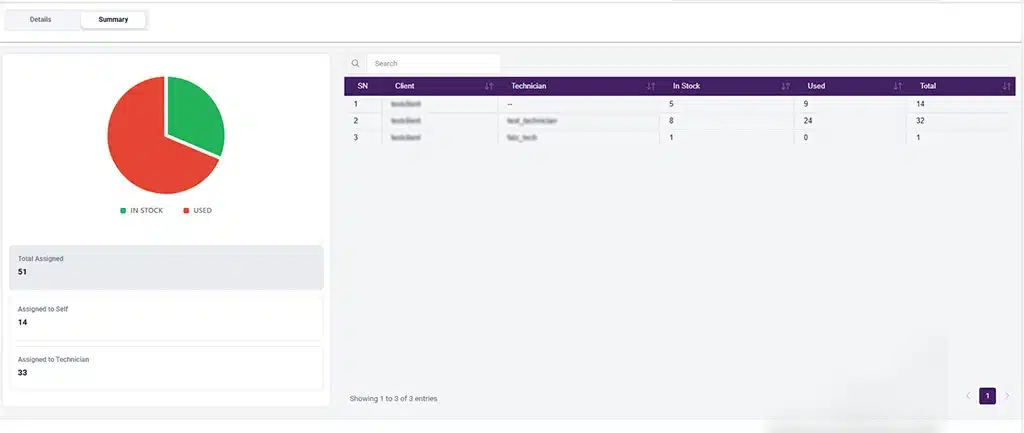
View device inventory status
4. Buffer inventory is now easier to manage
Inventory can be created as buffer stock and issued when needed. Devices remain visible with updated status, ensuring full traceability.
5. Simplified device onboarding through import
While adding a device or vehicle, users can now directly import device details from inventory instead of entering them manually, reducing effort and data entry errors.
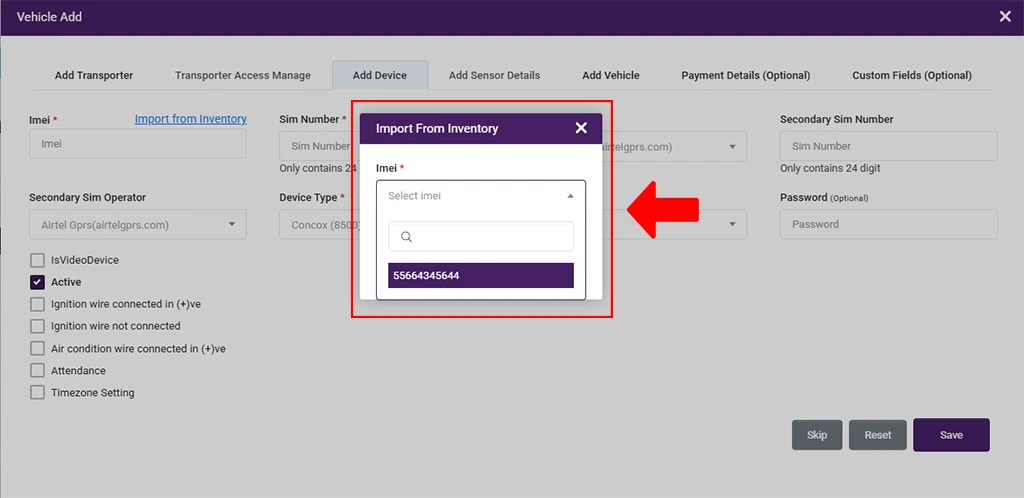
Easy import of device from inventory
6. Improved transfer functionality
The device transfer workflow has been enhanced with better logic, validations, and user experience, making transfers more accurate and controlled while reducing mistakes during device movement.
Why these matters
- No device movement without visibility
- Clear technician accountability
- Accurate inventory tracking across lifecycle
- Reduced confusion, losses, and manual follow-ups
Bug Fixes and Minor Updates
1. Geofence API update
The public REST API now supports updating existing polygon geofences. Clients can modify geofence name, category, and geometry coordinates directly from their own systems, instead of only being able to create geofences.
2. PDF Template enhancement for custom time range
PDF reports now support custom time-range selection. The travel summary layout has been updated with new fields, making it clear whether the report is generated for a custom time range or a standard time range.
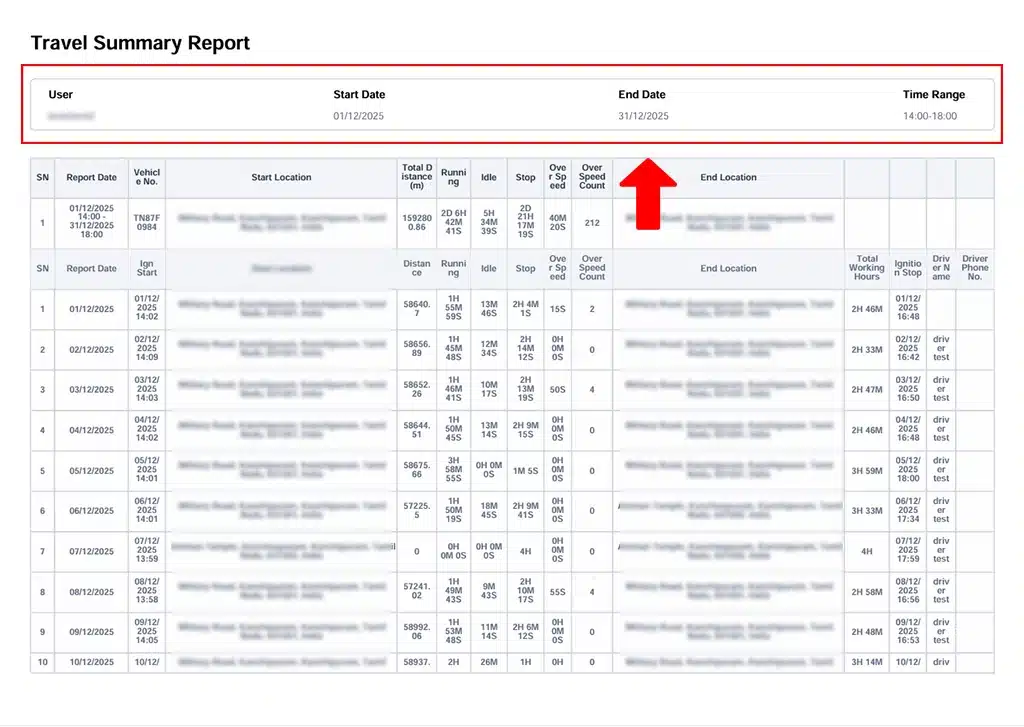
Travel summary report
3. Device Enhancements
- Temperature Support in GS07
Temperature functionality has been implemented for the GS07 device, along with related issue fixes. The device can now capture and support temperature data.
- Rely Configuration in tnavIC AIS140 4G
Relay configuration functionality has been added to the tnavIC AIS140 4G device, enabling better device control and configuration.
4. Panic Alert Template Update
The panic alert template has been updated to include the actual event location. The event location is now added to both SMS alerts and in-app notifications.
5. Dashboard Auto-Refresh Update
The dashboard now auto-refreshes for client user types as well. Earlier, auto-refresh was limited to transporters, but it is now authority-based and works for both clients and transporters.
6. Scheduled Reports – Validation, Time Format & Authority Fixes
Mandatory field validations and time format issues in the Scheduled Reports module have been fixed. Authority mapping has also been corrected so users can create and view new scheduled reports independently, without requiring old report authority.
7. Driver Documents – Real-Time Update Fix
Fixed an issue where updated driver documents were not reflecting in real-time on the driver app.
8. Trip Bulk Upload – Halt Time Issue Fixed
Fixed a bulk upload issue where leaving the optional Halt Time field blank caused the upload to fail or the loader to get stuck.
What’s New in Android & iOS Application?
- New SIM operator options have been added and are reflected in the mobile apps.
- The Device Inventory module is now available on mobile. Technicians can view their assigned inventory and transfer devices.
- Inventory import from mobile is supported for all user types.
Overall, the December updates made TrackoBit more reliable and easier to use. By improving visibility, accuracy, and control across key workflows, these enhancements helped teams operate with greater clarity and fewer manual dependencies in everyday operations.