

We have rolled out several new features and important updates in TrackoField this November. These include unified employee module, revamped employee history timeline, updated mileage rules, and a new manager deactivation flow.
Our field force management software is set to make your field operations smoother, smarter and more productive.
Major Updates to TrackoField in November 2025
Feature 1: Manager Deactivation Flow
Deactivating managers in TrackoField just got simpler. Now, when deactivating a manager, admins can choose one of the following:
- Deactivate All: The entire hierarchy (all executives & managers) under the manager, becomes inactive.
- Change Manager: The manager’s hierarchy is transferred to another manager at the same level (or root manager).
Additionally, the dropdown for change manager shows only the eligible replacement managers and does not include the managers under the deactivating manager. It also displays a dropdown for pending policy action: Auto-Approve or Auto-Reject. This is applicable for pending approvals like Leave, Override, Overtime, Device, Order, Customer.
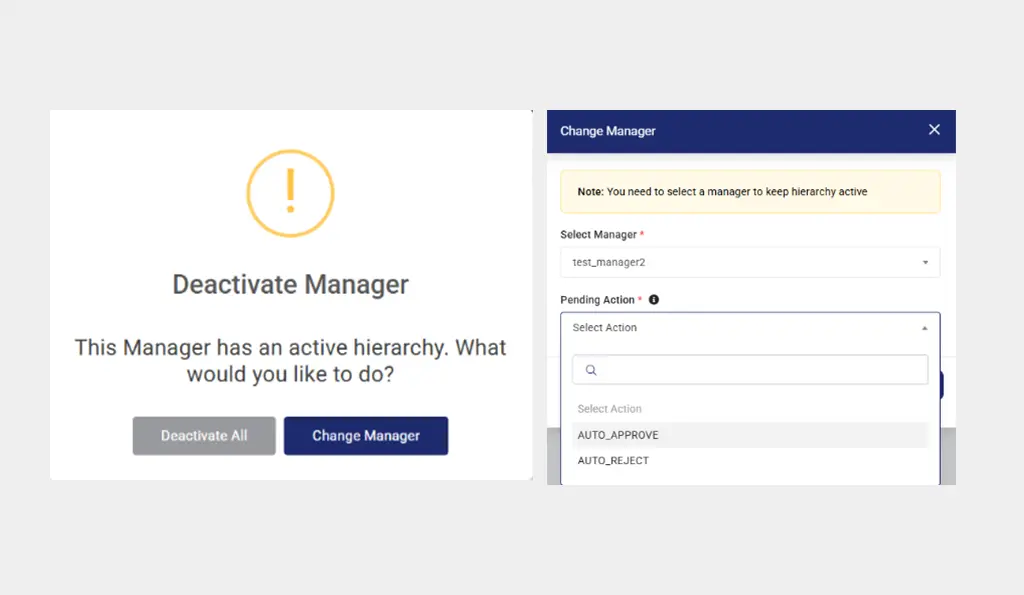
Manager Deactivation Flow in TrackoField
Things to Remember:
- Task approvals and facial recognition approvals are transferred to the selected manager.
- Expense approvals are not transferred.
- Tasks continue seamlessly. Pending/in-progress tasks are not cancelled.
- Reports are dynamically updated to reflect the newly assigned manager hierarchy.
- The manager deactivation is immediate (same day).
Update 1: Revamped Employee History Timeline
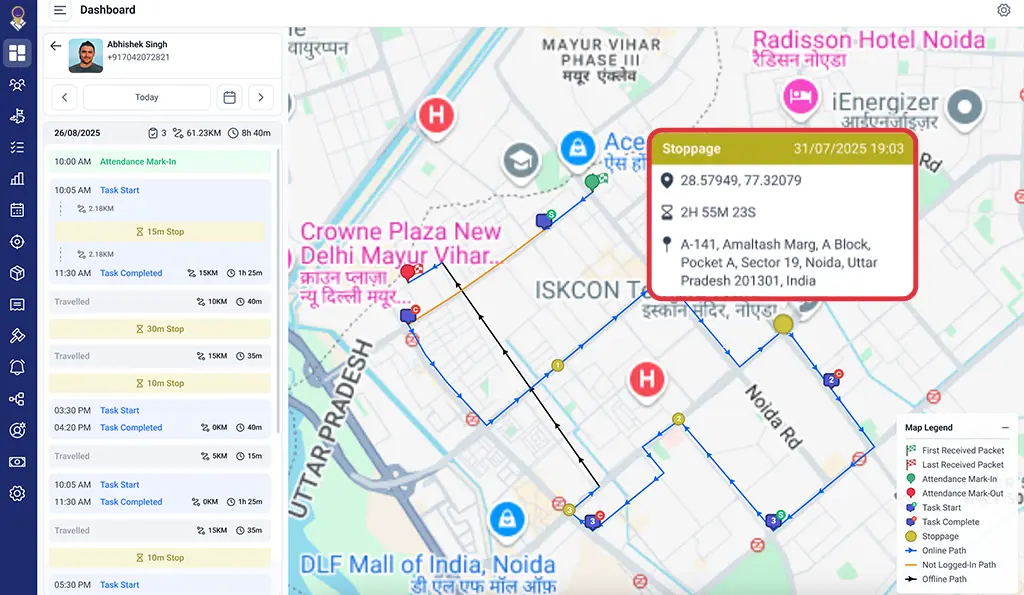
Revamped Employee Timeline History
The Employee History Timeline has been revamped to display detailed travel paths, stoppages, task insights, map indicators, and offline activity markers.
The enhanced employee history timeline enables managers to accurately track daily movements, task progress, and time utilisation with improved map interactions and fixed summary headers.
We have also added helpful tooltips to the TPR (Terminal Packet Record) for easier understanding of metrics and values briefly.
Note: This update is in its beta stage.
Feature 2: Unified Employee Module
We have introduced a unified employee module (Beta) merging Manager & Field Executive (FE) with the new Employee Type support.
An enhanced grid, new Add/Edit flow, bulk upload/update options, and standardised custom fields have also been added. Other changes include the following:
- Updated Roles & Permissions to a single Employee section for streamlined configuration.
- Standardised user details columns (Employee Username, Name, Code).
Update 2: Override Requests Functionality
The override requests functionality in TrackoField has been significantly overhauled. Now, employees can view their remaining monthly override request balance before submitting a request. This helps easily track applied and available override requests.
Also, managers can now apply their Leave and Override requests directly from the Team Overview Dashboard on the TF mobile app with auto-approval at the current level and escalation as per hierarchy.
Managers can even apply leave & raise override requests on behalf of employees from the Attendance Summary. For this purpose, a new toggle in company settings has been added.
We have also added a configurable monthly limit (up to 10) for override requests per employee. This limit can only be set once to ensure proper discipline in the workforce and prevent policy misuse.
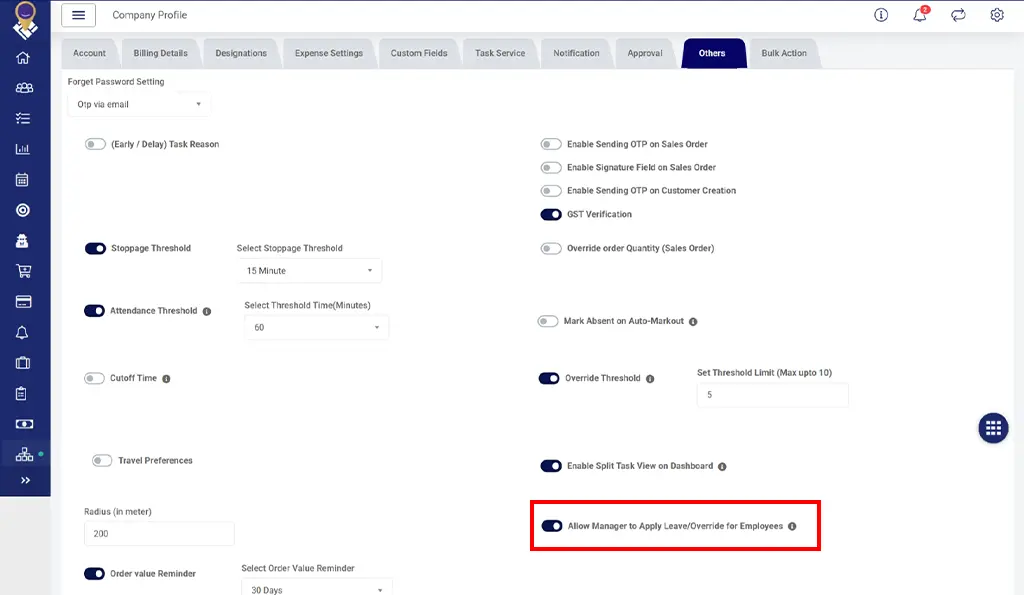
Configuring Override Leave Settings From TrackoField Company Profile
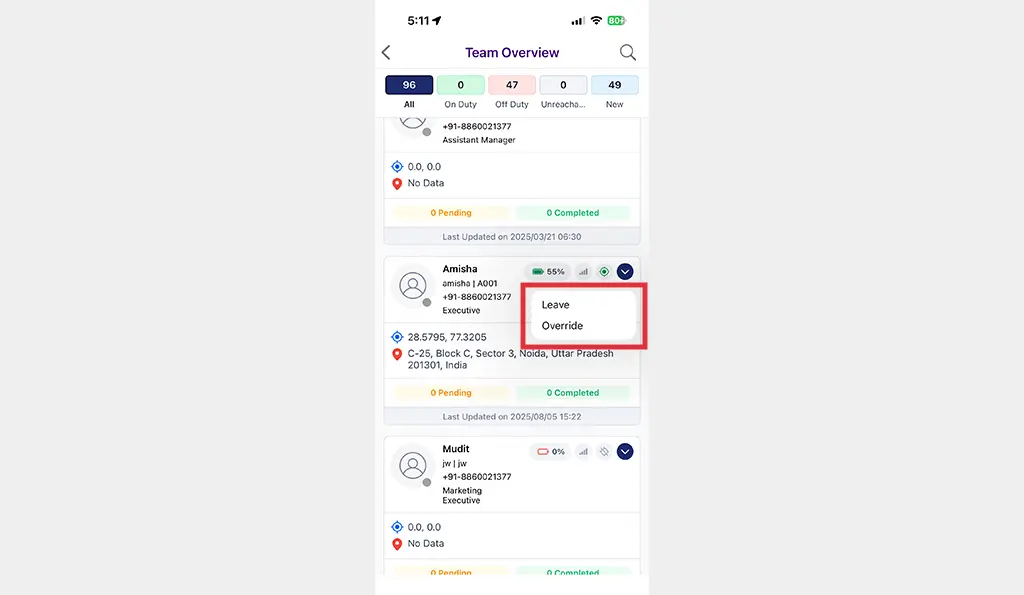
Applying Leave or Override requests in TF Mobile App
What’s New In The Reports Module?
- Managers can now download all reports (Distance, Leave, Expense, Overtime, Override, Task Distance) in Excel directly from the FE app.
- We have added standardised report columns (Employee, Manager, Designation, Code) across 8 mobile reports for consistency and easy cross-report comparison.
- We have added detailed Leave, Expense, Overtime, Override reports with filters, hierarchy selection, expandable rows, and Excel export.
- Inner daily distance table added inside Distance Report and is also in the Excel download.
- Added new bottom filters to all Distance Reports:
- Date Range (default: last 1 week)
- Employee Name (tree-level hierarchy)
- Reports now display day-wise distance details inside an inner expandable table.
What’s New in Mileage Rules?
We have added new rules under Mileage category:
- Allow Manual Distance Entry
- Allow New Request when Pending exist
- Manual Distance Entry for conveyance can now be controlled via policy:
- If enabled → Auto distance + manual distance field available.
- If disabled → Auto distance shown but manual distance field hidden.

Configuring Mileage Rules in Expense Settings
What’s new in TF Mobile App?
- Managers can now access the Team Overview Dashboard directly from the TF field executive (FE) app for real-time insights into team performance and operations.
- Managers can set a customer as “Default Customer” when creating a new customer.
- The selfie camera now opens by default in the FE app when visually verified attendance is enabled in field operations (FO) Settings. This was done to reduce time spent in switching cameras.
- Employees assigned to “No Shift” can now Mark Out without shift-completion warnings, ensuring smooth attendance logging.
- Task forms now retain previously filled details when the task is rescheduled. Employees are now able to see all previously submitted form data when they open a rescheduled task.
- Also, updated forms now allow edits while preserving attachments from earlier submissions.
- We have removed the “Scan Code” field from task start screen to provide a cleaner, faster workflow.
- When creating location-based tasks, current location and geofence are displayed automatically, with an option to override them via the search box. This helps in quicker task creation and more accurate geofence placement.
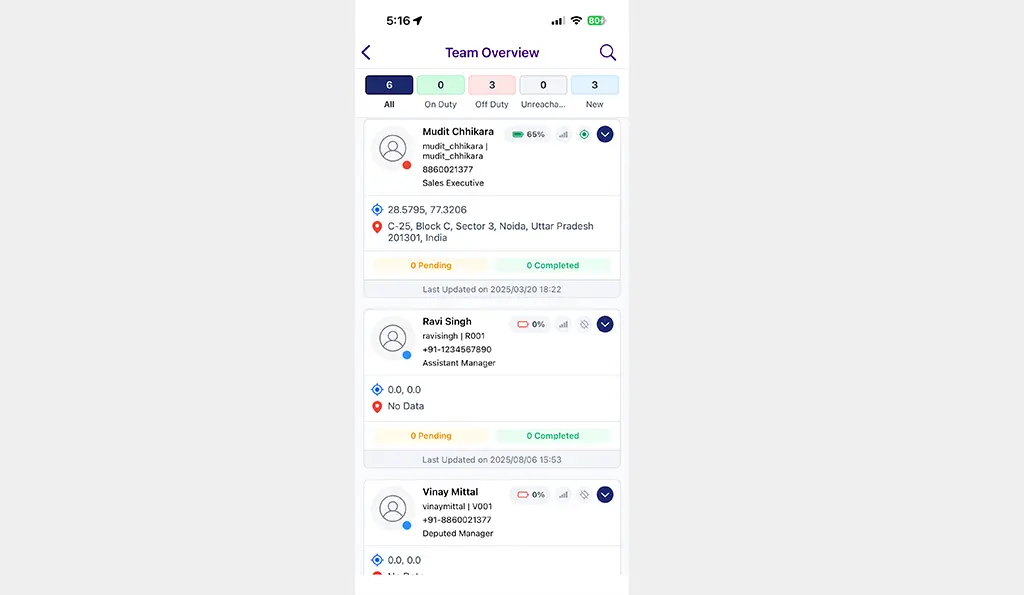
Team Overview Dashboard in TF App
Major Updates in TF Web Version
- Managers can view their own performance metrics along with team-level goals and progress from a single interface only.
- We have added an option to bulk upload/update public holidays under a new Bulk Import tab in the Company Profile. Managers can now centrally manage category-wise holidays from one place.
- Managers can now view all Custom Fields, including attachments, inside the Expense Approval modal. A scrollable custom field section has been added for better visibility.
- Multiple nearby events are now clustered visually on maps, improving readability and reducing clutter in dense activity zones.
- Both managers and employees can now receive overtime notifications for better transparency and tracking of additional working hours.
- Admins can now define and view custom fields within the Task Module (grid view) when creating or editing a task.
What’s More?
- We’ve updated all “Limit Expense Request” rules to apply per selected date instead of request date.
- The TF web dashboard search has been enhanced to support name, username, and employee code filters to enable faster and more accurate search.
- We have introduced a functionality to create quick filters in Sales Order Module with multi-condition support, AND/OR logic, reset/cancel options, and reusable saved filters.
- We have replaced existing dropdown filters with a hierarchical Team–Manager–Employee tree filter in the Sales Order Module. The logged-in manager’s team view is auto-applied by default.
TrackoField evolves every month with powerful updates that boost productivity and performance on the field.
So, keep an eye out for what’s coming next.
Catch Up On ->