
Quick Summary

- Field Force Automation Software streamlines task allocation and order management, enhancing efficiency for field teams in industries like HVAC and pharma.
- Key features include real-time tracking, smart scheduling, and sales order management, which reduce errors and improve productivity.
- Benefits of FFA software encompass higher employee productivity, better customer service, and data-driven insights for informed decision-making.
- Future trends in FFA include IoT integration, AI for predictive analytics, and augmented reality for enhanced training and route verification.
Discover the benefits and key features of field force automation software. Learn how it helps you streamline task allocation and order management for field teams.
Businesses with field teams in the HVAC, pharma, or product delivery industries rely heavily on field executives. They spend hours on the field visiting various clients.
Managing such employees using traditional tracking methods like WhatsApp or calls is challenging. Managers can even lose productive hours and drive up operational costs. This is why using field force automation software is a must to efficiently scale and manage your field teams.
It offers you a combination of tools to digitize, automate, and simplify field business operations. Dive in to learn about the working of a field force automation system, its salient features, and main benefits.
What is Field Force Automation Software and why is it Important?
Field force automation software (FFA), as the name implies, is the use of technology to automate and simplify field workforce operations. This includes digital task scheduling, task status and timeline monitoring. It also offers employees’ real-time tracking and sales order management.
The purpose of such automation is to optimize resource allocation. So, businesses can ensure on-time service task delivery or meet more sales orders. The adoption is also growing rapidly across industries. The global field force automation market is projected to grow from $ 4.56 billion in 2026 to USD 13.66 billion by 2034. This growth is driven by real-time field visibility and automation in field workforce management.
It reflects how field-heavy businesses are moving away from manual coordination. They are shifting toward structured and system-driven field operations. At its core, FFA software supports this shift by reducing the workload of field employees. So, they can better focus on their core tasks like client visits or sales. In other words, automation helps improve field employees’ efficiency. It saves their time and eliminates redundant or repetitive tasks.
FFA also eliminates human errors and ensures that you don’t have to rely on obsolete methods to track field employees. So, you can say goodbye to disputes over incorrect order entries or task overlaps. Although FFA emphasizes smooth workflow, it can also be used to simplify other field force operations. This includes orders, attendance, or expense management.
7 Essential Features to Look for in Field Force Automation Software
Task scheduling, real-time status tracking, and sales order management are the key features you should look for while choosing field force automation software. The right feature makes it easy to manage your field staff.
Below are the 7 top features you must look for.
1. Field Job & Task Scheduling
Planning your staff’s jobs and maintaining an undisturbed workflow is one of the top priorities of a field manager. Field force automation with its smart job and shift scheduling feature can reduce paperwork. It also prevents scheduling conflicts associated with manual task allocation.
The software also helps to reduce resource wastage and smartly assign tasks. Wondering how? Well, software like TrackoField offers:
- A smart calendar view to arrange daily to weekly tasks with priority, client name & deadline.
- Bulk tasks upload option for managers to assign months of tasks in advance.
- Provision to assign ad-hoc tasks if the business receives end-moment service requests.
Field force management software also helps to automate operations like creating or scheduling routine tasks. You can simply clone tasks or use a pre-existing template to save time. The software also lets employees self-allocate tasks or reschedule ongoing tasks if they want.
2. Real-Time Task Timeline & Status Tracking
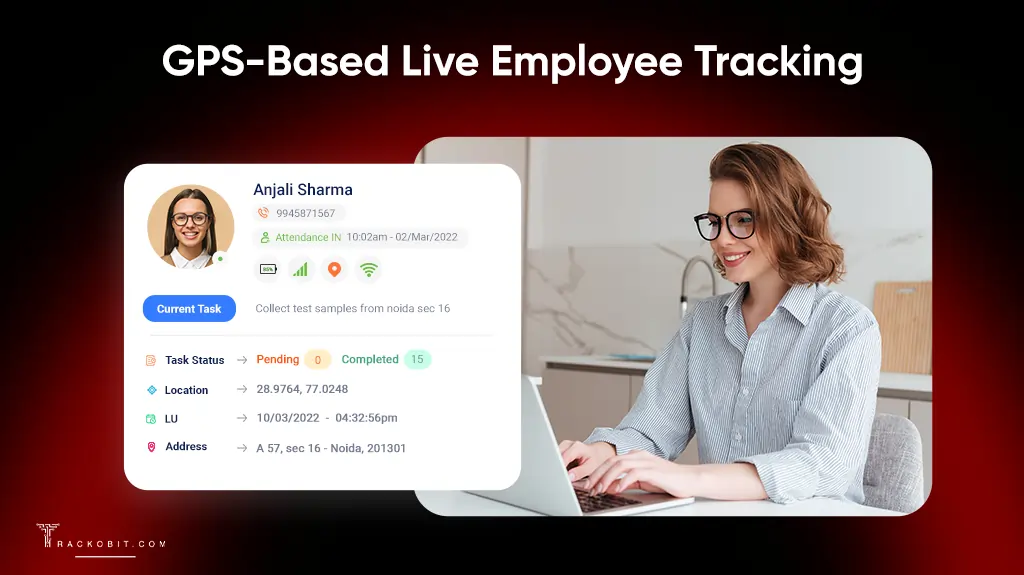
GPS Based Live Employee Tracking
Access the real-time location, task, and activity status of your employees. You can also check the daily task quota of any field employee, including his pending, completed, or rescheduled tasks. After analyzing this data, you can further assign tasks to your staff based on their:
- Proximity to the client site.
- Availability and bandwidth.
- Skillset and performance
- Existing relationships with customers.
3. Field Agents’ Visits & Locations Tracking
It’s essential to know the whereabouts of your mobile employees. How will you collaborate with them or assign them tasks if you don’t know what your staff is doing or where they are?
- View the live location and battery and network status of employees’ devices.
- Instantly check executives’ activity status (idle, available, and travelling).
- Track employees even when they’re offline or out of the service area.
- Make quick decisions to update employees’ tasks based on their locations.
- View the total distance travelled by executives and playback the exact routes.
Employees can mark their attendance offline as well. Their data is stored in packets which are synced to the cloud server once connectivity returns.
4. Sales Order Management
Sales is one of the most crucial aspects of on-field or D2D product-selling companies. However, most businesses struggle to compile the total sales volume, order quantity, and customer data. This is because the majority of sales reps still use paper-based sheets. FFA, with its inclusive order management software, helps streamline the process of sales order placement. The software can transform your sales. It allows your backend teams to:
- Create and maintain an extensive product list.
- Take orders on the go and add new customers quickly.
- Create custom forms and fields for feedback, surveys, etc.
- Adjust product prices and discounts.
- Track order progress and updates in real time.
5. Geo-verified Attendance Management
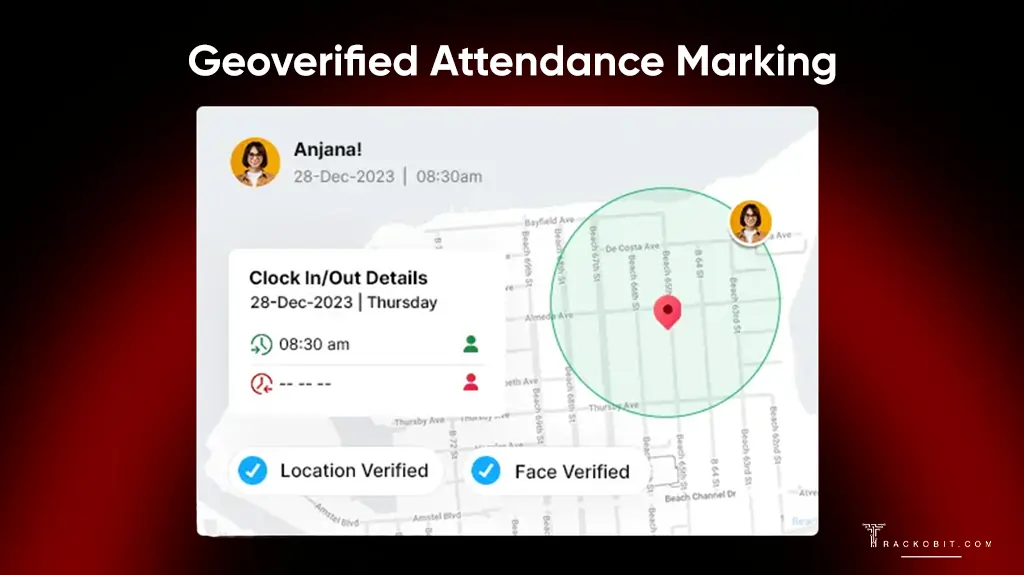
Geo-verified Attendance Management
More than real-time location tracking, businesses struggle with capturing their field agents’ attendance. Also, they struggle to verify availability at task sites. It’s challenging to monitor your employees’ work hours.
However, FFA software provides you with a clear idea of your employees’ time-spending habits. It logs the correct mark-in and mark-out times of your staff. It also monitors how long your employees work during the day and how many sanctioned or unsanctioned breaks they take.
Software like TrackoField lets you set up geofencing along with face recognition software. This way, you can ensure that only verified employees can mark attendance from designated locations. This combines location validation with identity verification for stronger control and fraud prevention.
FFA also records the timestamps and location coordinates when employees mark their attendance. Managers can mandate additional biometric proof, such as a selfie, for enhanced accuracy.
You can even sync tasks with attendance. This ensures that employees start working only after reaching the task site and marking their attendance.
6. Smooth Integration with 200+ Apps
The entire point of field force automation is to simplify the jobs of field managers and employees. That won’t be possible if they are juggling multiple apps when they could be using a one-stop solution for all their daily duties.
For instance, TrackoField is equipped with expense and payroll management modules. Field executives can easily log expenses with visual proof. Managers can validate their expenses and approve reimbursements. The attendance, leave, and task completion data can be further used to calculate accurate salaries.
TrackoField additionally supports integration with over 200 CRM and HRMS apps. This makes it a multifaceted FFA solution.
7. Custom Fields and Forms
One of the USP of field force automation software is custom forms and fields. Managers can create forms for employees to use while placing orders or completing tasks. These forms can be used to collect client feedback, invoices, or service tickets.
FFA software also lets you add multiple fields of different types such as text, numbers, bar code, document upload, date, time, or dropdown menu. You can limit the field entry to particular variables so that staff cannot add more entries or entry values than permitted.
Custom fields and categories can also be created for leave and expenses. You can define what type of leave you wish to have in your organization (sick, casual, maternity, etc.). The same can be done for expenses. You can create categories for types of expenses – stationery, food, lodging, etc.
5 Key Benefits of Choosing Field Force Automation Software
High employee productivity, better customer service, and low operational costs are the key benefits of choosing FFA software. Let’s learn how they benefit your field business and make your job as a field manager easier.
1. High Employee Productivity
Thanks to efficient and optimised field service scheduling, FFA software ensures employees aren’t overworked or underworked. It reduces task overlaps, double task allocation, and other common productivity-affecting errors. FFA also eliminates paperwork and lengthy admin tasks. So, employees can focus on their core duties instead of administrative work.
2. Better customer service
Since FFA boosts productivity, it results in employees visiting more clients. This helps in delivering satisfactory service. Such automated task and resource optimization ensure all employees reach the customer in time and don’t waste their working hours or the company’s resources. Employees can also finish their work on time and take up more service tasks. Hence, we can establish that FFA leads to better customer service by
- Reducing delays or miscommunication with clients.
- Lowering turnaround time.
- Improving FTFR.
- Ensuring executives stick to schedule and receive the latest updates.
3. Data-driven insights
Field force automation software stores all employee data on secure cloud servers. The software can analyze this data in various ways to provide insightful reports. Managers can track their employees’ performance, capitalize on growing trends, spot hidden patterns, and make informed decisions regarding the organization’s future. Some of the most useful reports FFA offers are:
- Task completion rate
- Target vs. achievement reports
- On Duty vs. Actual working hours
- Distance travelled reports
- Unreachable reports
4. Better communication and team coordination
Communication is one of the biggest challenges in fieldwork. You’re expected to communicate seamlessly with employees hundreds of miles away. However, team coordination is a breeze with field force automation software. It allows managers to:
- Guide employees and address their queries in real time.
- Assign tasks on the go.
- Quickly approve or reject expense or leave requests with valid reason.
Also, both employees and managers stay in the loop regarding any orders, expenses, and task updates. Every addition or edit is immediately notified to both parties.
5. Lower operational costs
FFA ensures all employees are working to the best of their ability and utilising company resources responsibly. Field force automation software minimises unnecessary expenses and optimises conveyance costs.
Plus, when all resources are utilised properly, it negates the chances of downtime, asset failure, or employee burnout. All of these would’ve otherwise drained the company budget. FFA also maintains accuracy and minimises human errors in data entry or form collection.
How Different Industries use Field Force Automation Software?
Industries like NBFC, MFI, and BTL use FFM software to track field activities, improve productivity, and verify on-ground tasks. Continue reading to know in detail.
1. NBFCs
NBFCs rely on field agents for loan verification, customer onboarding, and collection activities. FFM software helps NBFCs to:
- Track collection and verification visits in real time.
- Create structured BEAT plans for daily field visits.
- Record attendance with AI face recognition.
- Manage field tasks and P2P follow-ups remotely.
2. MFI (Microfinance Institutions)
MFI operations depend on field officers who regularly visit borrower groups for repayments and meetings. Most of this work happens in remote areas, where manual tracking becomes unreliable. Field force automation helps MFIs by:
- Tracking borrower meetings and repayment visits in real time.
- Recording agent and JLG attendance with face recognition.
- Monitoring field officer movement through live GPS tracking.
- Supporting offline data capture in low-network areas.
3. BTL & OOH
BTL & OOH operations both depend on on-ground activities. They handle brand activations, retail promotions, and outdoor media placements across cities and highways. Their success depends on how their field teams are executing their tasks. With FFM software,
- Tracking location-based tasks and field activities.
- Monitoring multi-city campaigns in real time at once.
- Capturing geo-tagged proof of work through photos.
- Verifying activation visits with geo-tagged attendance.
4. After-Sales Service Teams
After-sales service operations depend on technicians who visit customer locations for installation, maintenance, repairs, and support. FFM software helps them by offering:
- Remote task management for customer visits.
- Real-time tracking of field agent locations.
- AI facial attendance for fraud prevention.
- Offline data capture in low-network areas.
How to Implement Field Force Automation in Daily Operations?
Businesses can implement field force automation by moving daily field coordination from calls and messages to a single structured system. Managers can assign tasks, field staff receive clear instructions, and updates are recorded as work progresses on the field.
With field force management software like TrackoField, daily execution becomes easier to follow. It provides tasks, attendance, and live updates in one place. So, you can reduce manual follow-ups and get a clear, verified view of your field operations.
The Future of Field Force Automation – 3 Rising Trends
IOT, AI, and augmented reality are the top 3 FFA trends that are bound to be invaluable in the coming years. Most field force automation software companies are already leveraging these trends to future-proof themselves. It’s important to consider the following trends seriously.
1. IoT
The Internet of Things (IoT) is the collective network of connected devices that use cloud communication to exchange data. The most common examples of IoT are smart homes and fitness bands.
Now imagine if IoT could be integrated into field force automation. Your employees could keep track of their tasks using just a wearable device like a watch. They could also log their attendance easily and respond to updates faster.
Managers would also be able to track their employees’ health data, in addition to their location and battery status. After all, field jobs are tough! It’s only right to prioritise your workforce’s well-being.
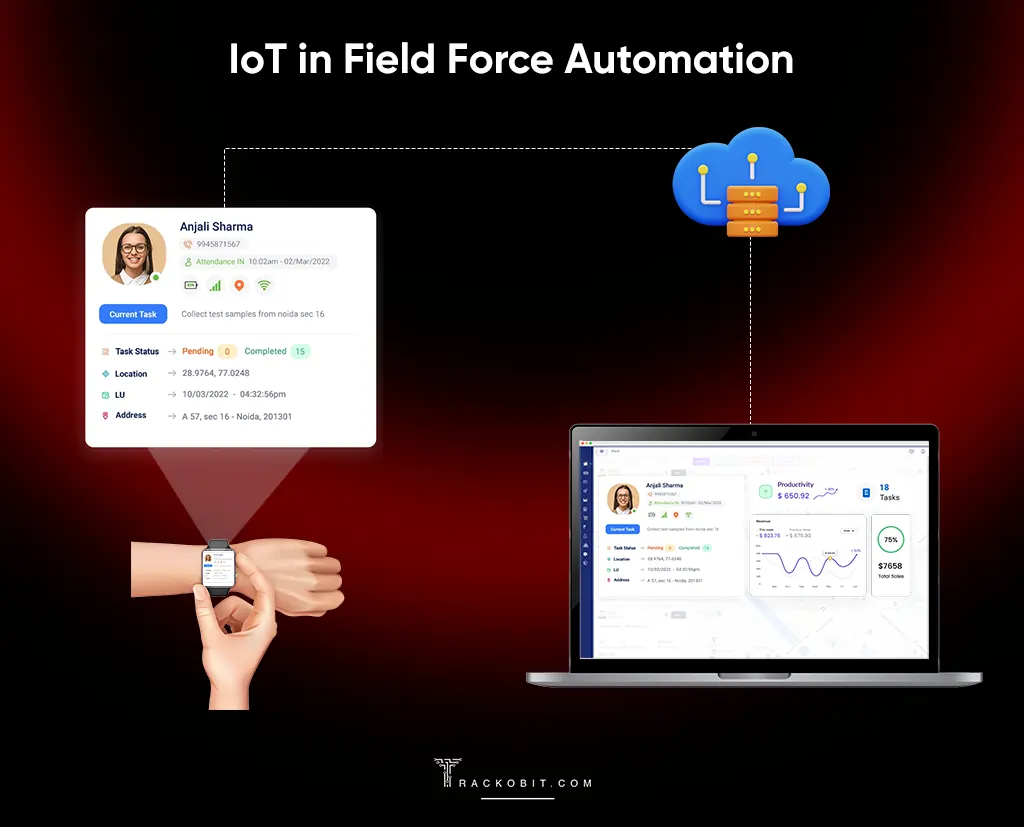
IoT in Field Force Automation
2. Artificial Intelligence
Artificial intelligence is the talk of the town these days. From vehicles and personal computers to the arts, AI is being implemented in every domain. Field force automation systems are not behind either in capitalizing on AI. Machine learning algorithms and smart chatbots are already in use in many FFA solutions.
By studying historical data, HVAC businesses can better equip themselves and allocate extra technicians and service staff in advance. They can improve HVAC technicians dispatching to task sites. AI can predict what weather or time of the year would require more effort from employees. This enables businesses to solve problems before they occur and minimize downtime. AI can also help to:
- Speed up field operations.
- Maintain a smooth workflow.
- Reduce repetitive tasks.
- Improve employee task scheduling.
Moreover, AI can also help speed up field operations, reduce repetitive tasks, and improve employee task scheduling.
3. Augmented Reality
The best field force automation software like TrackoField already allow route playback options. Managers can view the exact routes their employees take on a particular day. With virtual or augmented reality, managers could view the routes from the POV of the employees. This would be helpful to verify field employees’ trips better. AR/VR can also help to train your technicians, especially if real training is risky.
Why TrackoField is the Best Field Force Automation Software in 2026?
TrackoField is an AI-powered field force management software. It lets you clone tasks, eliminate scheduling conflicts, and improve team coordination. TrackoField offers:
- GPS location tracking to monitor live field movement and verify customer visits.
- AI face attendance software for accurate mark-ins and mark-outs.
- Geo-tagged proof of work to verify visits, installations, and activations.
- Remote task management software with real-time field activity updates.
- Offline mode for tracking field activity in no or low-network areas.
- Conversational AI manager bot for instant insights into field employee activities.
- Automated BEAT planning for optimized routes and better visit coverage.
Together, these features make TrackoField the best field force automation software in 2026. But this is just the tip of the iceberg. To know more about the benefits of field force automation, get in touch with the TrackoField staff today!

Frequently Asked Questions
-
How can a Field Force Automation solution boost sales performance?
The highlight of field force automation software is streamlining workflow and improving staff productivity. This boosts sales performance by:
- Reducing the administrative burden of field executives.
- Ensuring faster customer visits.
- Reducing turnaround time.
- Making field operations easy and error-free.
With satisfied customers and a productive workforce, sales are bound to skyrocket.
-
Which industries can benefit from field force automation?
FFA can be a game-changer for any business that relies on mobile employees. These can be product-based or service-based companies. Here are a few industries that depend on field executives the most and can benefit from FFA software.
- Retail
- Pharma and Phlebotomy
- Maintenance and Repair
- HVAC and After-Sales
- Agriculture
- Logistics and Transport
-
How does field force automation software work?
FFM software assigns tasks digitally to the field staff. It tracks their attendance, location, and task status in real time. Employees can update work through a mobile app. Managers can see all activity on a dashboard, without calls or manual follow-ups.
-
What is the difference between field force automation and sales automation?
Field force automation software focuses on managing everything that happens in the field. This includes employee tracking, attendance, and on-ground activities. Sales automation software, on the other hand, mainly about managing the sales process such as lead tracking, follow-ups, and deal closures.
-
Which is the best field force automation software in India in 2026?
The best field force automation software in India in 2026 depends on how well it handles real field operations includes live tracking, attendance, and reporting in one software. One of the widely used options in this space is TrackoField. It brings task tracking, geo-verified attendance, and field reporting into a single dashboard.
-
How much does field force automation software cost?
The cost of field force automation software usually depends on the number of users, features, and the scale of field operations. Smaller teams may only need basic tracking and task management. While larger organizations often require advanced features like live tracking, attendance, and reporting. The best approach is to use field force automation software like TrackoField. It offers custom pricing depending on your business needs.

Parul is a content writer with 2+ years of experience in B2B and SaaS domains. She creates clear, actionable content for TrackoBit and TrackoMile, focusing on fleet management, last-mile delivery, and... Read More


Related Blog

Field Worker Safety: Complete Guide to Protect Field Staff
Wondering how to ensure field worker safety? You are in the right place. This blog explores the key risks in…

Sales Territory Management: 6 Best Practices for High-Performing Teams
Poor sales territory management can quietly stifle sales growth. Understand how companies can create high-performing territories.
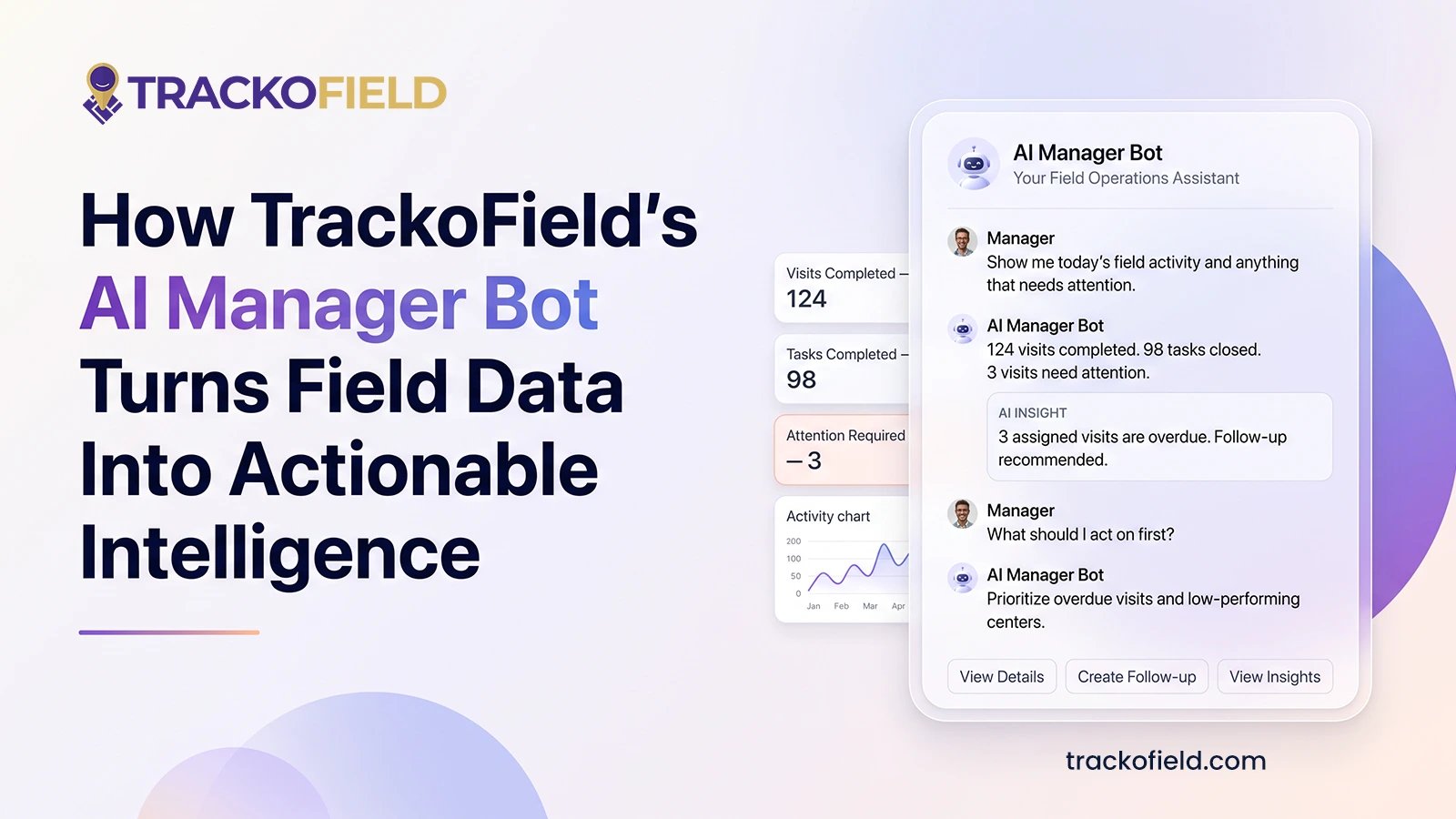
TrackoField’s Manager Bot: Bringing the Future of Field Force Intelligence to You Today
TrackoField’s AI Manager Bot transforms field force management into field force intelligence by turning operational data into instant AI-powered insights.

Face Recognition: What It Is, How It Works & Benefits for Field Teams
Facial recognition is a way of identifying or confirming an individual’s identity using their facial features. Read this guide to…


Your inbox awaits a welcome email. Stay tuned for the latest blog updates & expert insights.
"While you're here, dive into some more reads or grab quick bites from our social platforms!"Stay Updated on tech, telematics and mobility. Don't miss out on the latest in the industry.