
Fleet monitoring means using GPS, telematics, and software to track vehicles. This guide helps managers dive deeper into this ecosystem to pick the right solution.
Every trip leaves behind a trail of operational data. Fleet monitoring helps businesses turn this into actionable intelligence. It provides insights into vehicle movement, driver behavior, routes, and fuel. This is done by combining GPS and telematics technology to track commercial vehicles. With real-time and historical data, fleet managers can identify inefficiencies and improve safety. They can also optimize resources, improve asset utilization, and make informed decisions.
A fleet management software takes this visibility a step further. Data picked up by a hardware is transmitted to a cloud server. This is where the information can be consolidated and displayed to fleet managers. Such connected flow gives a clearer view of what is happening on the road. Let’s explore in detail.
What is Fleet Monitoring?
Consider a truck traveling from Delhi to Jaipur. As it moves, onboard GPS and telematics devices capture data. These are geofences, speed, fuel level, and engine parameters. This is then transmitted to clouds in data packets. The fleet manager can view this in real time through a centralized dashboard.
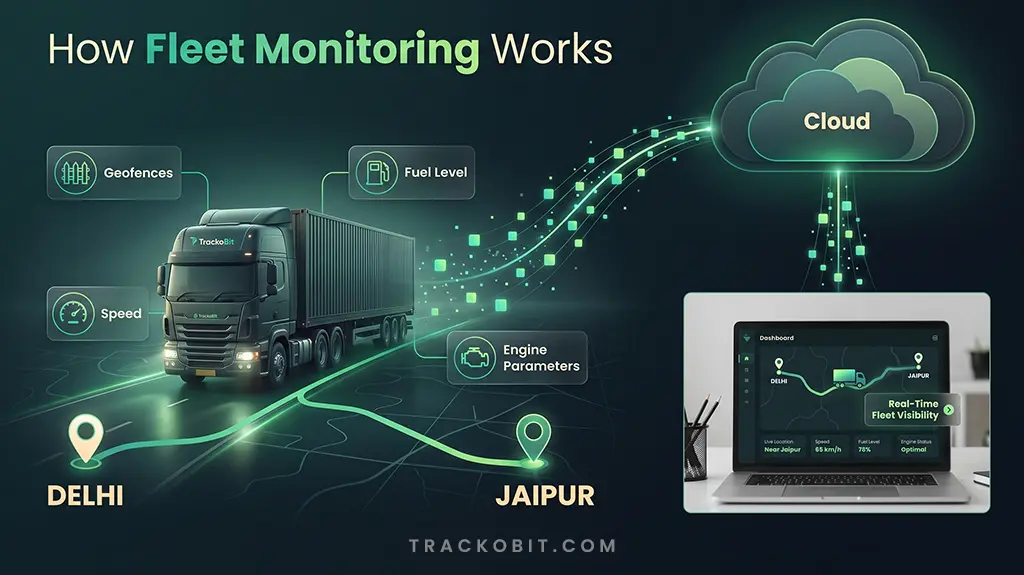
Fleet Monitoring Workflow
But fleet tracking and monitoring is more than knowing where a vehicle is. It connects data from drivers, vehicles, and trips. This helps provide a broader view of fleet operations. Managers can monitor route adherence and detect speeding and idling. They can also check fuel consumption and identify vehicle-related issues. Such visibility helps fleet managers take action before minor operational issues become bigger.
Real World Example
PepsiCo. uses extensive GPS telematics and route optimization platforms. This is similar to Coca Cola’s bottling networks. This way, they monitor driver safety and reduce fuel burns.
Fleet Monitoring vs. Fleet Tracking vs. Fleet Management: Key Differences
The key difference lies in scope of visibility, control, and fleet data. These terms are often used interchangeably. However, they serve different purposes.
| Factor | Fleet Tracking | Fleet Monitoring | Fleet Management |
| Primary Focus | Vehicle location and movement | Real-time fleet visibility and performance | End-to-end fleet operations |
| What it Tracks | Location, routes, and trip history | Location, driver behavior, fuel, and vehicle health | Vehicles, drivers, fuel,routes, costs, compliance,and performance |
| Data Used | Primary GPS data | GPS + telematics + vehicle + driver data | Fleet-wide operational and business data |
| Key Objective | Know vehicle location | Know what is happening across the fleet | Optimize and manage the entire fleet |
| Features | Live location, route history, and geofencing | Live tracking, alerts, fuel monitoring, driver tracking, and vehicle health | Tracking, monitoring, dispatch, reporting, cost, and compliance |
| Use Case | Basic GPS visibility | Operational visibility and performance analysis | Comprehensive fleet operations |
Key Components of a Fleet Monitoring System
A fleet monitoring system combines hardware, software, and system controls. These come together to transmit, process, and act on fleet data. Read in detail.
Hardware Essentials
- GPS Tracking Device: Uses space satellites to find the exact vehicle location. It also includes speed, movement, and direction.
- On-Board Diagnostics (OBD): GPS OBD trackers connect with the vehicle’s diagnostics system. This collects fault codes and vehicle health data.
- Telematics Unit: Combines GPS, data processing, and cellular connectivity. This helps collect vehicle information and transmit it to the cloud.
- Sensors: Captures data for tire pressure monitoring, tracking temperature and cold chain monitoring.
Software Essentials
- Fleet Management Software: Consolidates driver and vehicle data into a centralized platform. This helps with analysis and monitoring.
- Cloud Infrastructure: Stores and processes incoming fleet data. This makes it accessible to fleet managers and authorized users across devices.
- Analytics and Reporting: Convert raw fleet data into reports and driver performance insights. It helps identify trends and gaps.
- Mobile App: Allows fleet managers and field teams to access vehicle information. They also get alerts and operational data remotely.
System Controls
- Geofencing: Creates virtual geographic boundaries or geofences and triggers alerts. This is when vehicles enter and leave defined areas.
- Alerts & Notifications: Sends automated alerts for speeding, harsh braking, and route deviations.
- Data Security: Protects fleet data through authentication, encryption, and access management.
- Rules and Configurations: Allows businesses to define monitoring patterns, reporting rules, and alerts.
How Does a Fleet Monitoring System Work?
A fleet monitoring system works in steps like data collection and data transmission. Discover the entire workflow in detail below.
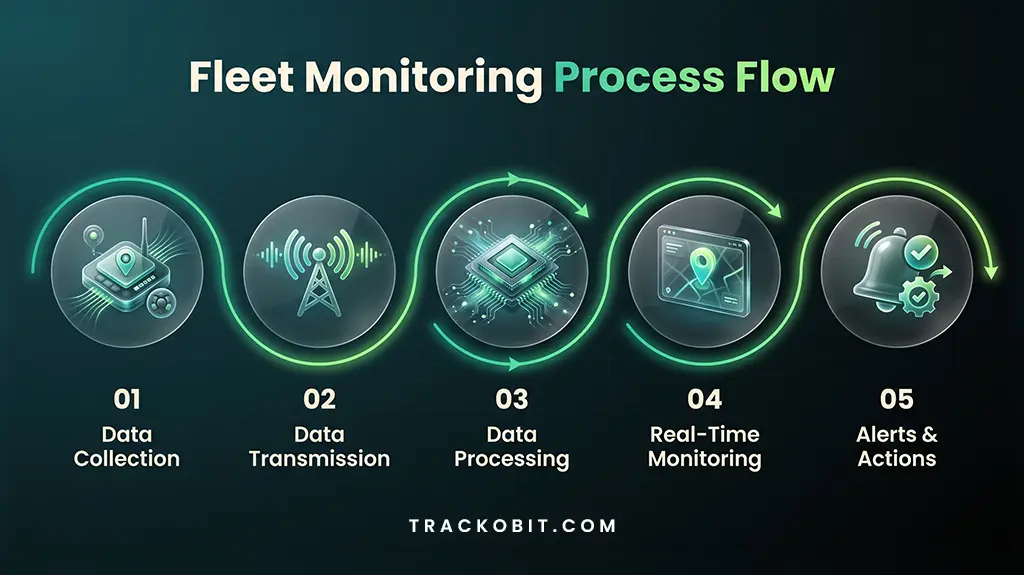
Fleet Monitoring Process Flow
Step 1: Data Collection
Telematics units, GPS devices, and sensors collect data. It typically includes location, speed, engine status, driver behavior, and fuel parameters.
Step 2: Data Transmission
The collected data is transmitted to a cloud server from the trucks. This is through cellular networks or similar communication protocols.
Step 3: Data Processing
The cloud platform processes and organizes all incoming data. This raw data is then turned into meaningful fleet metrics.
Step 4: Real-Time Monitoring
Fleet managers access data via a dashboard. This helps them monitor vehicles, routes, driver activities, and fleet performance. All in real-time for accuracy.
Step 5: Alerts and Actions
The system triggers alerts for multiple events. The typical ones are speeding, harsh acceleration, cornering, and freewheeling.
The process does not end with visibility. Managers can respond quickly and improve daily fleet operations. This creates a cycle of data collection, analysis, and action. This way, the total cost of ownership is reduced.
Advantages of Using a Fleet Vehicle Monitoring Software?
The top benefits of fleet monitoring are improved visibility and fuel efficiency. See the full list below.
- Improved Fleet Visibility: Track vehicle location, routes, and activities in real-time. All from one dashboard.
- Better Fuel Efficiency: Identify excessive idling, inefficient routes, and fuel pilferage. This will reduce overall consumption.
- Enhanced Driver Safety: Track speeding, acceleration, and harsh braking. It helps promote safe driving practices.
- Optimized Vehicle Utilization: Analyze trip patterns and vehicle usage carefully. This lets managers improve asset allocation.
- Proactive Maintenance: Actively monitoring vehicle health and diagnostic data. This will help Iidentify potential issues.
Suggested Read: – What is Fleet Maintenance? Benefits, Examples, and Process
- Data-Driven Decisions: Use past reports and analytics to identify trends. This helps improve operational planning.
- Lower Insurance Premiums: Consistent monitoring can help with better risk management. It also supports favorable insurance terms.
- Environmental Sustainability: Support sustainable fleet goals by reducing unnecessary idling, and inefficient trips.
- Improved Compliance: Get compliance with HOS, CDL, and ELD for better vehcile visibility.
Ultimately, fleet monitoring software helps both small and enterprise businesses. It helps build a safer, green fleet.
What are the Challenges in Fleet Monitoring?
The top challenges in fleet monitoring are data overload and integration complexity. See the key points below.
1. Data Overload
Fleet monitoring systems generate large data volumes from GPS devices and sensors. It can be difficult for fleet managers to identify insights without effective analytics. They might not be able to spot the issues that need attention.
2. Connectivity Issues
Commercial vehicles often operate in low or no network zones. Inconsistent coverage delays data transmission. This further affects real-time visibility. As a result, fleet managers are unable to monitor and respond proactively.
3. Integration Complexity
Fleet monitoring systems should be integrated with ERP, CRM, or Fuel monitoring software. This is to exchange information. Poor integration can create data silos and might increase manual efforts.
4. Hardware Maintenance
Sensors, telematics devices, and GPS trackers do not remain functional without proper maintenance. They provide inaccurate data which can impact vehicle safety and health evaluation. Improper maintenance can also cause costly fixes later on.
5. Data Security and Privacy
Fleet systems handle sensitive information. This includes vehicle location, business data, fuel data, and security codes. Without strong access controls and security measures, protecting this data can be tough.
Overall, addressing these challenges requires the right combination of software like TrackoBit. This, along with hardware, and well-defined operational processes.
Suggested Read: – The Top 7 Fleet Management Challenges
The Cost of Fleet Monitoring Systems: What Affects Pricing?
There is no one-size-fits-all price tag when it comes to fleet monitoring. The cost depends on several factors combined. This includes:
- Fleet size and type
- Software capabilities
- Tracking hardware
- Network connectivity
- Customization levels
Basic GPS tracking solutions are generally more affordable. Advanced ones with vehicle diagnostics, e-locks integration, driver behavior monitoring, and AI video telematics cost more. Businesses should also factor in installation, subscription, and maintenance expenses. Software like TrackoBit offers custom pricing. This helps choose a solution based on monitoring requirements.
Choosing the Right Fleet Monitoring Software
Map your features, compare pricing, and check user reviews. This helps choose the right fleet software. See what else you must consider.
Map the Features
Shortlist the most critical and unique features that your fleet needs. This could include white-label GPS tracking, route planning, fuel monitoring, and video telematics. Now compare fleet solutions that provide everything in one place for easy management.
Run a Pilot Test
Test the software with a small number of vehicles. This must be done before rolling it out to your fleet. It gives you a chance to evaluate connectivity, data accuracy, and alerts. Understanding the overall performance
Request a Live Demo
Look for companies that offer product demos. Getting a walkthrough of the features can help you know how relevant the software is in the real world. It also gives a sneak peek into the workflows to help finalize it for your fleet business.
Compare Pricing
Request detailed pricing from your shortlisted providers. Compare hardware, installation, subscription, maintenance, and integration expenses. This will help calculate the total ownership cost. Businesses will get an idea of how much they will pay over time.
Check User Reviews
The best way to get started is to check Capterra, Trustpilot, and Crowd. Compare the star rating of the software. Read reviews from existing customers. This helps understand ease of use, reliability, scalability, and technical support.
Evaluate Customer Support
Carefully check the onboarding process, training, and response time. Post-deployment support is critical to ensure smooth adoption and minimize operational disputes. Also, check whether the provider offers ongoing assistance as the system scales.
Conclusion
A fleet monitoring system shows more than data on the map. It provides operational context behind every trip. This helps businesses understand performance and take timely actions. With connected vehicles, real-time telematics, and analytics, businesses build efficient and intelligent fleets.
Fleet operations will continue to evolve. Businesses that invest in connected systems will stay ahead of changing demands. Fleet managers have already started future proofing their fleets by embracing these technologies. These capabilities will play a critical role in building smarter operations.

Frequently Asked Questions
-
Are fleet monitoring and GPS tracking the same?
They are not same but similar. GPS tracking shows where a vehicle is located. It is a subset of fleet monitoring. GPS uses small devices that communicate with space satellites. This helps the exact latitude and longitude. Fleet monitoring tracks parameters like speed, location, fuel, engine, and drivers. It is a broader concept than GPS tracking.
-
What data does a fleet monitoring system collect?
A fleet monitoring system collects real-time data. Others are fuel usage, e-locks, driver insights, and vehicle health data. In short, businesses can expect a whole range of telematics information. The raw data is turned into actionable information and displayed on dashboards
-
How much does fleet monitoring software cost?
The cost of fleet monitoring software depends on the type and extent of features. For example, basic tracking software is typically affordable. Software that offers fuel, temperature, and driver monitoring. All of these, along with AI analytics is costlier. The best way to get the right pricing is to look for custom solutions.
-
How do I choose fleet monitoring software for a small fleet?
Choose fleet monitoring software based on your operational needs. This is applicable for small fleet. Next, get essential capabilities such as GPS tracking, real-time alerts, and route monitoring. Others must include reporting, ease of use, reliable customer support, and transparent pricing. Lastly, ensure the software can scale as your fleet grows.

Shemanti is a Content Marketing professional with 7+ years of experience in shaping credible narratives across B2B products. As the Content Team Lead for TrackoBit, TrackoField, and TrackoMile, she br... Read More


Related Blog
ADAS System in Cars: How It Works and Why It Matters
ADAS road safety system is a technology that uses sensors and software to detect danger and alerts the driver to…
Safer Alerts, Shareable History, Faster Maintenance in TrackoBit
TrackoBit now adds an Evidence Model and authority-based access for ADAS and DMS alerts in video telematics, Vehicle History Sharing…
Fleet Management Requirements: The Complete Guide for 2026
Every wondered what exactly fleet management requirements are? Or, why do they matter? This guide helps you understand in detail.
7 Fleet Management Best Practices Every Fleet Manager Needs
Learn 7 fleet management best practices to improve safety, vehicle utilization, efficiency, and fleet performance in 2026.


Your inbox awaits a welcome email. Stay tuned for the latest blog updates & expert insights.
"While you're here, dive into some more reads or grab quick bites from our social platforms!"Stay Updated on tech, telematics and mobility. Don't miss out on the latest in the industry.