
TrackoBit’s November 2025 release brings smarter, faster, and more intuitive fleet monitoring enhancements. With smarter reporting, improved visual clarity, global SMS support, expanded device compatibility, and upgraded mobile capabilities, every update is built to strengthen accuracy and deliver more control to users.
Whether you manage regional fleets or global operations, these improvements ensure TrackoBit scales with your business while simplifying daily operations.
Major Updates in TrackoBit’s Web App for November 2025
New Feature 1: Custom Time Range in Travel Summary Reports
TrackoBit introduces Custom Time Range filtering, giving complete control over when data is calculated and displayed.
With this update, users can now:
- Select a custom date range (e.g., 1 Nov – 30 Nov)
- Define custom time windows (e.g., 8:00 AM – 2:00 PM) to calculate daily travel stats
- View results broken down day-wise within the selected time frame
This means fleets operating in shifts, business hours, or industry-specific time cycles will now get more relevant and actionable insights – not just basic mileage data.
What this solves for Integrators & Clients:
- More accurate billing and expense calculations
- Better reporting for field operations, school transport, public mobility, logistics and rental fleets
- Cleaner dashboards, no data noise outside required operational hours
- Seamless customization for region-wise time zones and compliance needs
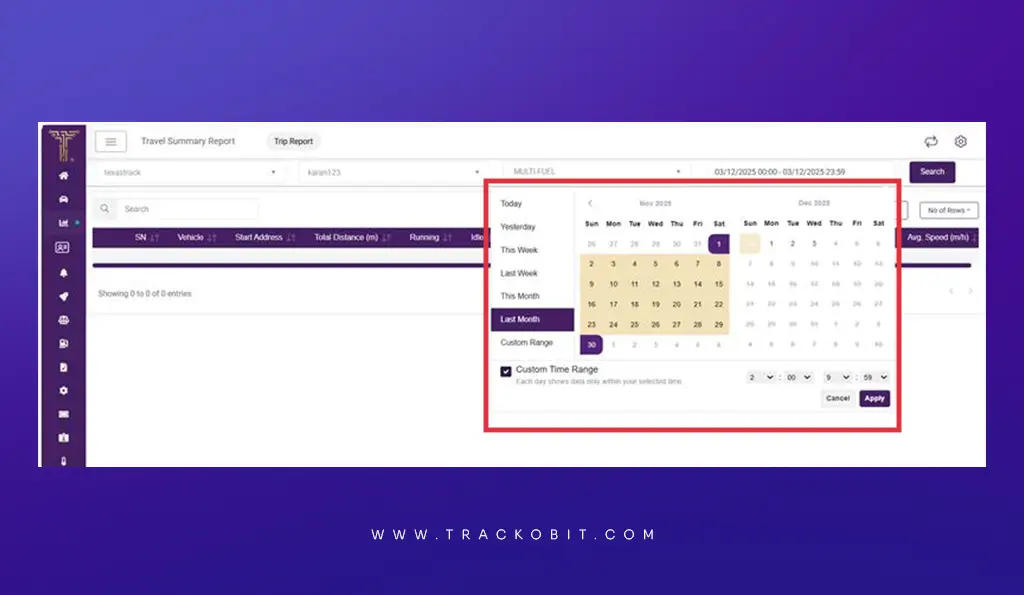
Select custom time and date range for more streamlined data
New Feature 2: Multi-Temperature & Humidity Implementation
TrackoBit now fully supports multiple temperature and humidity sensors per vehicle, bringing greater accuracy and visibility for cold chains and refrigerated logistics.
Key improvements:
- Monitor multiple compartments with different temperature zones
- View complete sensor data across dashboards, reports, temperature charts, and the mobile app
- Ensure compliance, product safety, and proof of cold chain integrity
Whether it is pharmaceuticals, dairy, frozen goods, or multi zone reefer logistics, now your fleet can track every degree in every chamber.
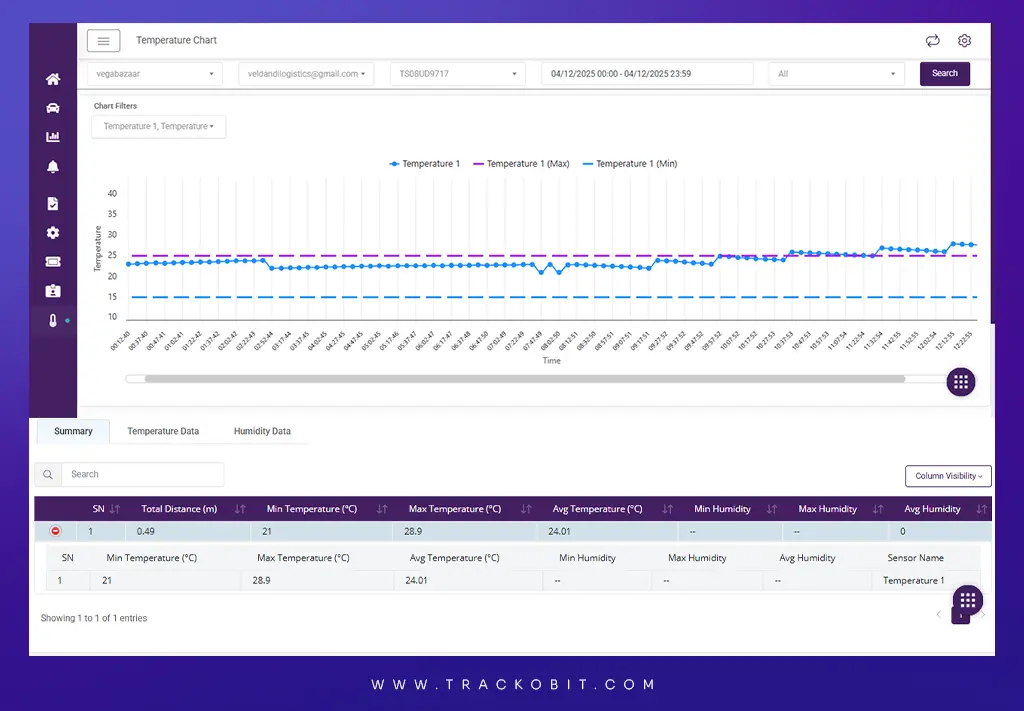
Check multi-compartment temperature & humidity across dashboard and reports
New Feature 3: Upload and Manage Driver Documents
Users can now upload and store driver’s documents directly on the platform. All uploaded documents are easily accessible on both the web application and the driver’s mobile app.
This update allows:
- Centralized and secure document storage
- Quick access to licenses, IDs, permits, and compliance records
- Drivers to view their own documents while on the road
No more manual tracking or scattered paperwork. Everything stays organized, accessible, and compliant.
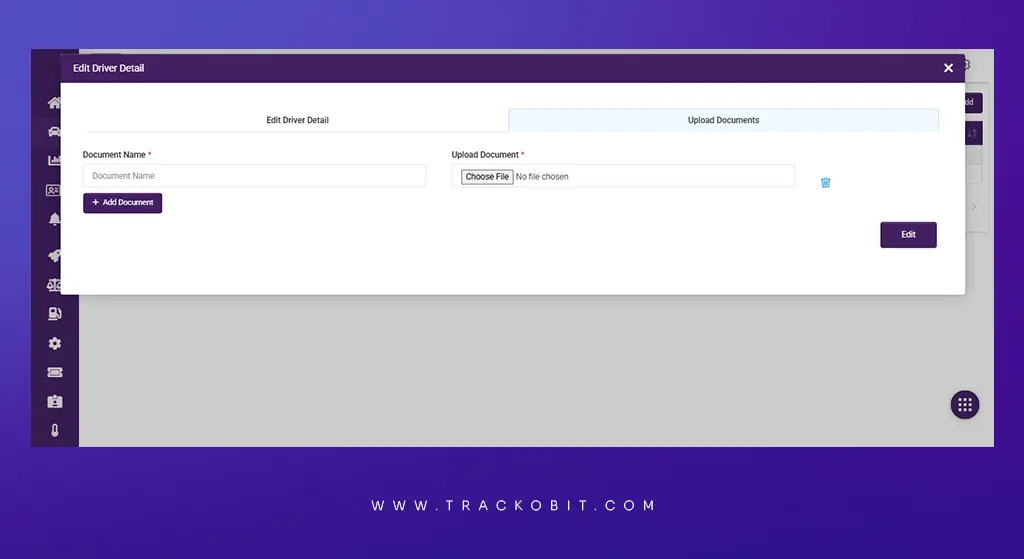
Upload driver documents while onboarding them
New Feature 4: New SMS API (Mobishastra) Integration
TrackoBit now supports the Mobishastra SMS API, enabling faster and more reliable alert delivery across multiple regions. With this integration, international clients can receive seamless and consistent SMS notifications regardless of location or roaming status.
Bug Fixes and Minor Updates
1. Alert Center Behavior Has Been Improved
The alert window now opens only when relevant subscription data exists, preventing unnecessary pop-ups.
2. Alert Summary Report Enhancements and Fixes
Several improvements have been made to the alert summary report to ensure accuracy, controlled access, and consistent reporting across platforms.
Key updates include:
- Accurate event counts now reflect authority-based access
- Restricted users can no longer access alert data once permissions are removed
- Time zone inconsistencies between the web report and scheduled alerts have been fixed
3. Parameter Modal Fix
The Cancel button of the device page in Parameter Modal is now functioning correctly and closes the window as expected, improving workflow efficiency.
4. Scheduled Reports Enhancements and Fixes
Several improvements have been made to scheduled reports to ensure accurate data delivery and consistent formatting.
Key updates include:
- Added the missing Alias column in the Scheduled Distance Report
- Corrected header unit formatting in the Travel Summary Report
- Fixed cache sync issues so unit values now update correctly based on profile settings
5. Arrow Marker Visibility Optimization
Arrow markers on the map are now clearer and easier to interpret, especially on long travel routes. The marker density adjusts based on zoom level, showing fewer markers when zoomed out and gradually increasing visibility as users zoom in.
This optimization ensures:
- Clean and readable long route paths
- Better trail interpretation without clutter
- Improved visibility and clarity at every zoom level
6. Share URL Update: Improved History Visibility
Restricted time range data shared through a URL is now fully visible inside the History modal. Earlier, certain entries within restricted durations were not displayed. With this enhancement, shared tracking links now show complete and accurate history as expected.
7. GPS Raw Data Packet Enhancements
Storage and handling of GPS raw packets have been optimized for better system performance. Users can now easily view the latest packets from each category, including login, GPS, and HB packets for quicker diagnostics and smoother usability.
8. New Protocol Support: RP Apollo
TrackoBit now supports the RP Apollo protocol, expanding device compatibility and enhancing data ingestion for a wider range of hardware integrations.
9. New Device Type Added: G11
The G11 device type is now available and configured with the same settings as the External Wanway 8502 under the NAVI TB category, ensuring quick setup and seamless integration.
What’s New in Android & iOS Application?
- Multi-fuel support is now available on Android. Users can track multiple fuel sensors per vehicle with real-time trends and clearer visibility into refills and fuel usage.
- Android dashboard now supports Group wise filtering, making fleet navigation faster and more structured.
- iOS users can now access the updated TB Driver app with multi-region availability.
These updates strengthen platform reliability, expand global compatibility, and enhance user experience across the web and mobile. With improved reporting, smarter visibility, new integrations, and broader device and regional support, TrackoBit continues to evolve with user needs, ensuring fleets stay efficient, compliant, and future ready.