
This release brings smarter control, faster communication, and deeper visibility across the platform. From real-time WhatsApp alerts to context-aware alerting and improved data handling, every update is designed to reduce noise, improve response time, and make fleet operations more efficient, scalable, and aligned with real-world workflows.
Major Updates in TrackoBit’s Web App for March 2026
Update 1 – WhatsApp Alert Integration
Alerts can now be delivered via WhatsApp, enabling real-time notifications based on configured alert templates to any designated stakeholder. Unlike in-app alerts that require login, these notifications reach users instantly on a platform they actively use, ensuring higher visibility. For example, if a vehicle exits a geofence or remains idle beyond a set threshold, the alert is triggered and delivered directly on WhatsApp for immediate action.
This significantly improves response time, reduces missed alerts, and strengthens communication across distributed teams by bringing critical updates into a high-engagement channel.
Key Improvements
- Instant alert delivery via WhatsApp
- Template-based alerts configurable for any user
- Higher open and response rates
- Reduced dependency on dashboard monitoring
- Improved operational responsiveness
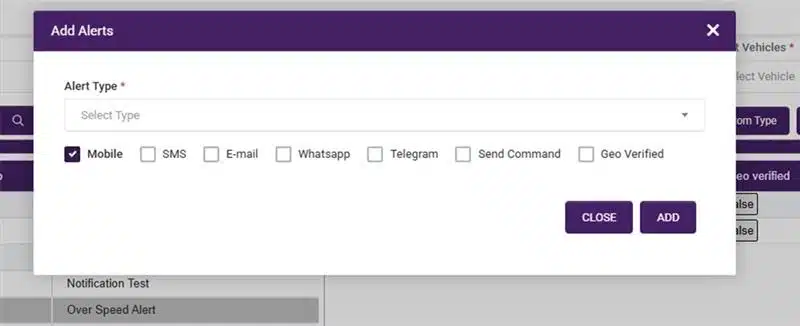
Notifications reach users instantly on a platform they actively use
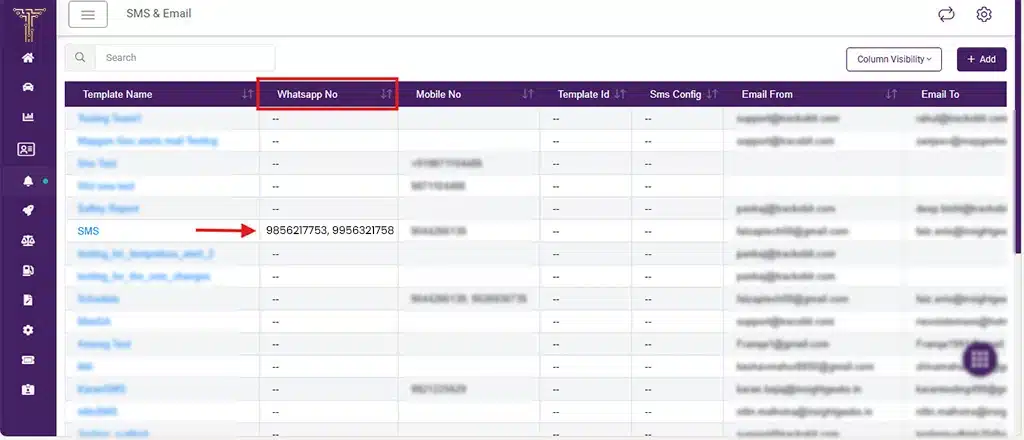
Real-time alerts from configured templates, sent to the right people instantly
Update 2 – Improved Alert Settings (On-Trip Logic)
Alert configuration is now context-aware, allowing users to define alerts based on whether a vehicle is on a trip or not. You can choose to receive alerts only during active trips and opt out when the vehicle is idle or off-duty.
By aligning alerts with trip status, it eliminates unnecessary notifications. For example, a vehicle parked overnight will no longer trigger idle alerts unless it is on an active trip.
This enhancement supports 7 configurable alert types:
- Geo Exit Restriction
- Abnormal Stoppage
- Geofence Idle Duration
- Geofence Entry Restriction
- Idle
- Unreachable
- Battery Disconnect
Key Improvements
- Alerts triggered based on trip status (on-trip vs non-trip)
- Support for 7 configurable alert types
- Reduced alert noise and false positives
- Higher relevance and better signal-to-noise ratio
- Greater control over alert configurations
Update 3 – Command Send & Response Logs
Users can now send commands to devices directly from the platform and track their responses through detailed logs. This enables full visibility into command execution and device communication. For example, if a GPS device needs to be restarted, you can send the command from the platform and immediately verify whether the device acknowledged or executed it.
This feature centralizes device control, reduces dependency on external tools, and significantly improves troubleshooting. With complete logs of command requests and responses, teams can quickly identify issues and ensure reliable device operations.
Key Improvements
- Direct device control from the platform
- Real-time command response tracking
- Faster troubleshooting and issue resolution
- Complete audit trail for command execution
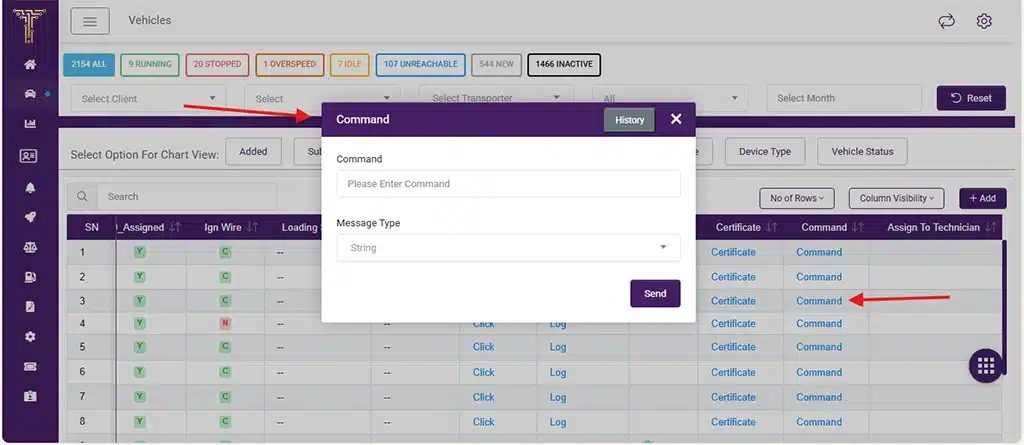
Send commands to devices directly from the platform
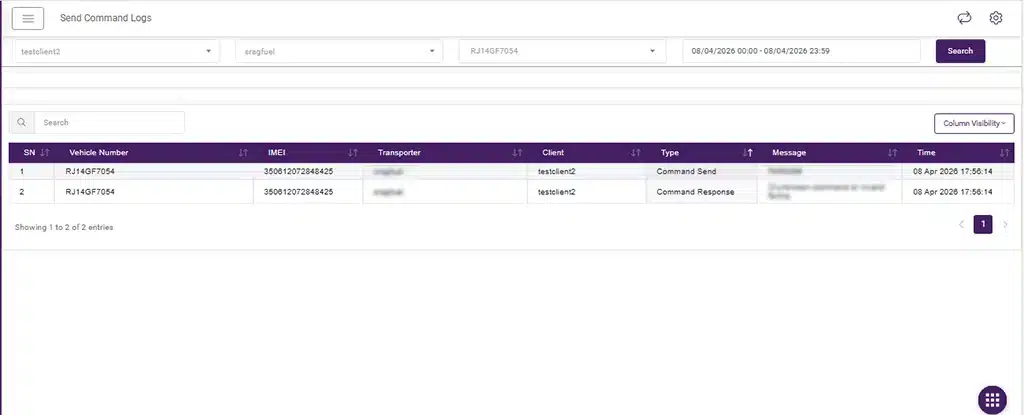
Track every response with detailed logs
Update 4 – Fuel Chart with Odometer Integration
Fuel charts now include odometer data, enabling direct correlation between fuel consumption and distance traveled. This provides a more accurate view of vehicle efficiency. For example, if a vehicle consumes 25 liters of fuel but covers only 90 km, the system helps identify inefficiencies or potential anomalies like fuel theft.
By combining fuel and distance metrics in a single view, this update enables deeper analysis and better decision-making around fuel usage and cost optimization.
Key Improvements
- Fuel efficiency visibility (fuel vs distance)
- Easier detection of anomalies and misuse
- Improved cost analysis and optimization
- Enhanced reporting accuracy
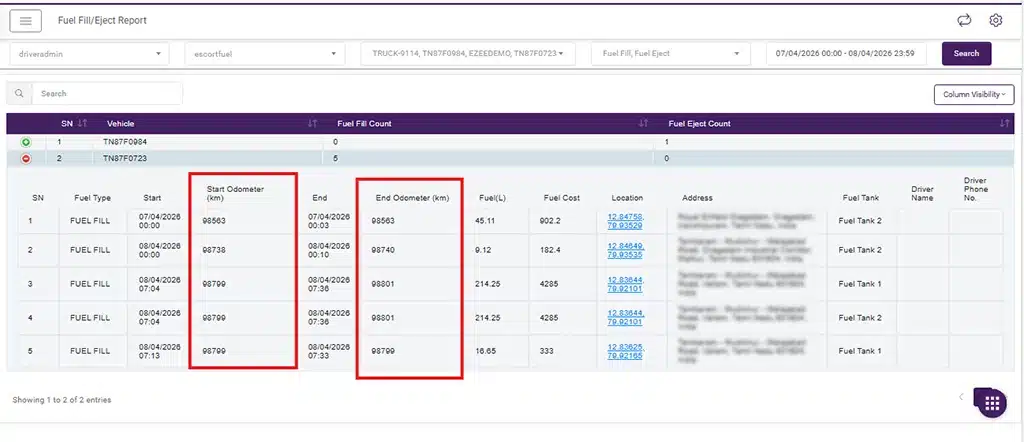
Fuel charts now link consumption with distance using odometer data
Update 5 – Live Trip Dashboard
A new Live Trip Dashboard provides real-time visibility into only active trips, removing clutter from inactive vehicles. Instead of monitoring the entire fleet, users can focus on vehicles that are currently in operation. For example, if 300 vehicles are registered but only 120 are on active trips, the dashboard shows only those 120.
This improves monitoring efficiency, enables faster decision-making, and ensures teams focus on what matters in real time. It also enhances coordination during live operations by providing a clear view of ongoing activity.
Key Improvements
- Real-time visibility of active trips only
- Reduced dashboard clutter
- Faster and more focused monitoring
- Improved operational efficiency
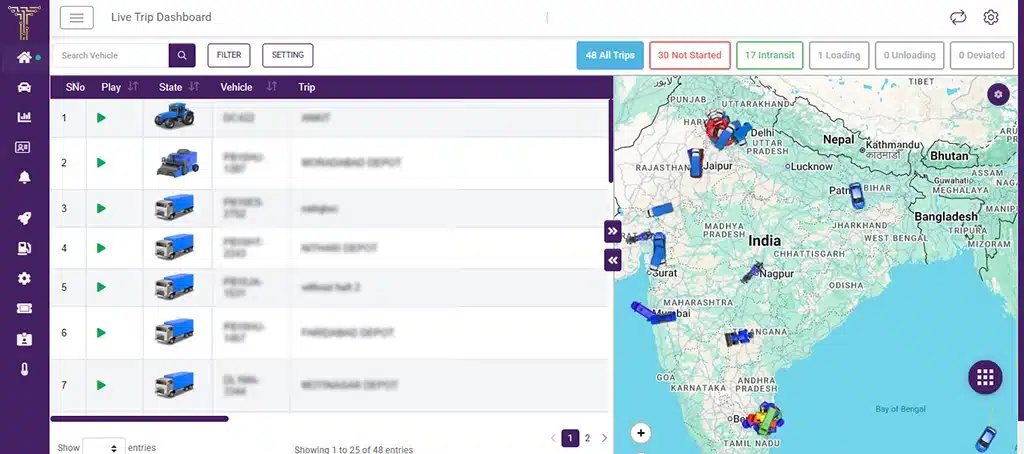
Live Trip Dashboard shows only active trips in real time
Update 6 – API-Driven Configuration
Enum values like device types, vehicle types, and operator lists are now handled dynamically. Any new value added on the web reflects instantly on mobile without waiting for an app update. This is only for android app right now.
This removes release dependency and ensures real-time sync, making updates faster and more seamless across platforms.
Minor Updates and Bug Fixes
1. Multi-language Support
Added 4 new languages: Croatian (Hrvatski), Serbian (Latin & Cyrillic), and Slovenian (Slovenščina) for regional usability. Enables global teams, especially in Europe, to use the platform in their native language. This update is in web, iOS, and Android apps.
2. Live Tracking – Today Path Fix
Resolved issues where current-day tracking was inaccurate or lagging, especially for long routes. Improves real-time tracking accuracy and ensures smoother path visualization.
3. Restructured Camera Implementation (Mettax & Mettax TB)
Rebuilt the camera module with code-level optimizations for better performance and stability. Ensures faster streaming, smoother playback, and more reliable image processing. This is applicable across web, iOS, and Android.
4. Geofence Trip Report Enhancement
Added stoppage duration filters: <5 min, 5–10 min, 10–30 min, 30–60 min, and >1 hour. Allows more precise trip analysis based on how long vehicles stayed at locations.
5. Device Packet Report
Introduced a new authority-based report to access complete device packet-level data. Helps in debugging, validation, and deeper visibility.
6. Dashboard Improvements (Geofence Filter)
Added a geofence filter in map settings to view vehicles within specific areas. Improves dashboard performance and helps the map load faster by reducing data clutter.
7. Custom Alerts Visibility & Sensor Fix
Fixed the issue where triggered alerts were not visible and showed old sensor values. Alerts now display correctly with real-time, accurate sensor data.
8. Driver Bulk Upload Validation
Added proper date field validation to prevent invalid uploads. Ensures cleaner data entry and reduces upload errors.
9. TopFlyTech Device Support with ICCID & MSI
Added support for TopFlyTech devices with ICCID (SIM serial number) and MSI (SIM phone number), now visible in the vehicle list and dashboard. This improves device identification and helps manage SIM inventory more efficiently.
10. Driver Assignment Report & Driver List Enhancements
The driver assignment report is now accessible via the iButton, along with total distance and duration based on assigned and unassigned time and unit conversion support. Device ID is also added to the driver list view, making driver-device mapping clearer and easier to manage.
11. Custom Report Enhancement
Total distance and duration are now shown in the report footer, giving quick summary insights without manual calculation.
What’s New in Android & iOS Applications?
- Users can now view and manage multiple camera feeds on both Android and iOS for better monitoring.
- Vehicle playback trip reports are now clearer and more accurate across Android and iOS for more reliable trip insights.
iOS Updates
- Trip report has been improved in the playback, with some minor bug fixes.
- Intercom feature allows real-time communication via the dashcam, enabling users to speak through the app.
- New POI types like attendance, shop, and supermarket have been added for better location categorization.
- Camera grid layout has been improved for smoother viewing of single and dual-channel video streams.
- Fixed group filter issue to ensure accurate filtering and better usability in the app.
Conclusion
With this release, TrackoBit continues to move toward a more intelligent and adaptive ecosystem. By strengthening integrations, refining automation, and improving data accuracy, the platform is enabling more real-time, insight-driven operations. Going forward, TrackoBit will continue to focus on scalability, precision, and building systems that evolve with dynamic business needs.