
In February, we rolled out several enhancements across TrackoBit. These updates focused on improving reporting, data visibility, and operational control. With new reports, bulk upload features, improved validations, and added device support, users can now manage fleet operations more efficiently and access clearer insights.
Let’s have a look.
Major Updates in TrackoBit’s Web App for February 2026
New Feature 1 – BRAG Report
We have introduced BRAG Reports in TrackoBit to provide a clearer and more structured view of driver performance. BRAG stands for Blue, Red, Amber, and Green, a color-coded reporting framework used in several countries to evaluate driver behavior based on predefined compliance and safety rules.
With this update, fleet managers can quickly identify how drivers are performing against key parameters without manually analyzing multiple data points. The report automatically categorizes performance levels, making it easier to detect risky driving patterns, highlight compliant drivers, and take corrective action where required.
These improvements help businesses:
- Improve driver performance visibility
- Strengthen driver accountability
- Promote safer driving behaviour
- Enable faster operational decisions
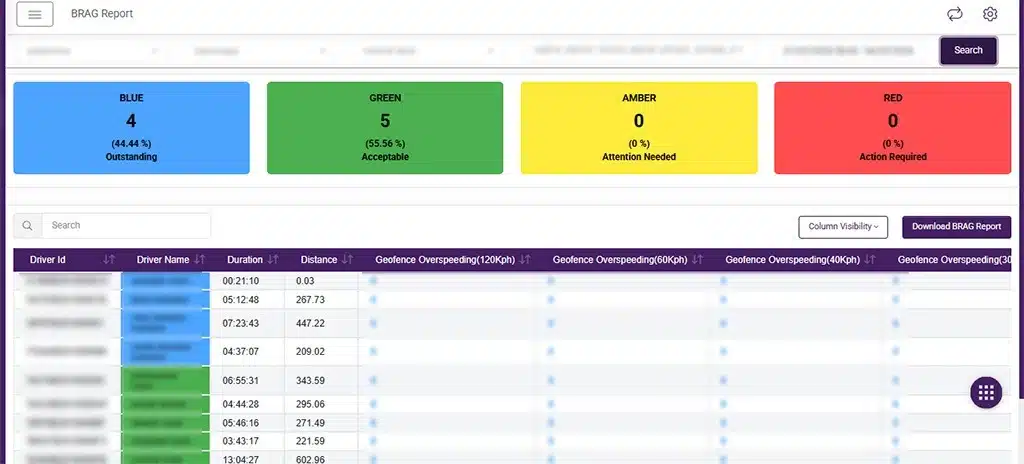
BRAG Report
New Feature 2 – Integrated Vehicle Summary Report
We have introduced the integrated vehicle summary report to provide a consolidated view of key vehicle performance data in one place.
Earlier, critical insights such as travel summaries, fuel data, driver behavior, and alert reports were available in separate reports. This made it difficult for users to analyze vehicle performance without switching between multiple reports.
With this update, data from these reports has been integrated into a single customizable report under the Custom Report module. Users can now select the specific data columns they need from different reports and create a tailored report that fits their operational requirements.
This allows fleets to build a report that shows only the most relevant data points without unnecessary fields.
Key benefits
- View multiple vehicle performance metrics in a single report
- Select and combine data columns from different reports
- Create customized reports based on operational needs
- Reduce time spent switching between multiple reports
- Improve data visibility for faster decision-making
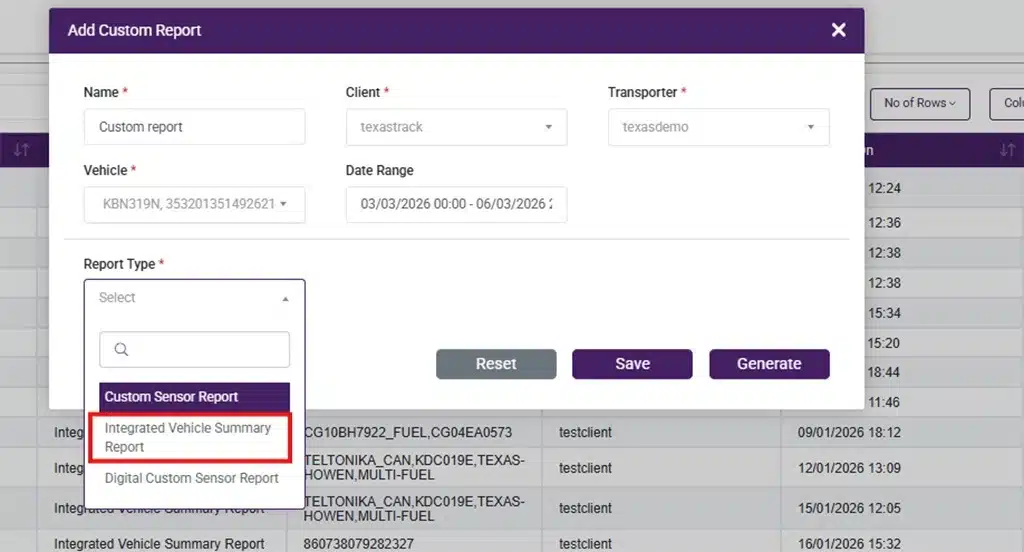
Select Integrated Summary Report from Travel Summary Report
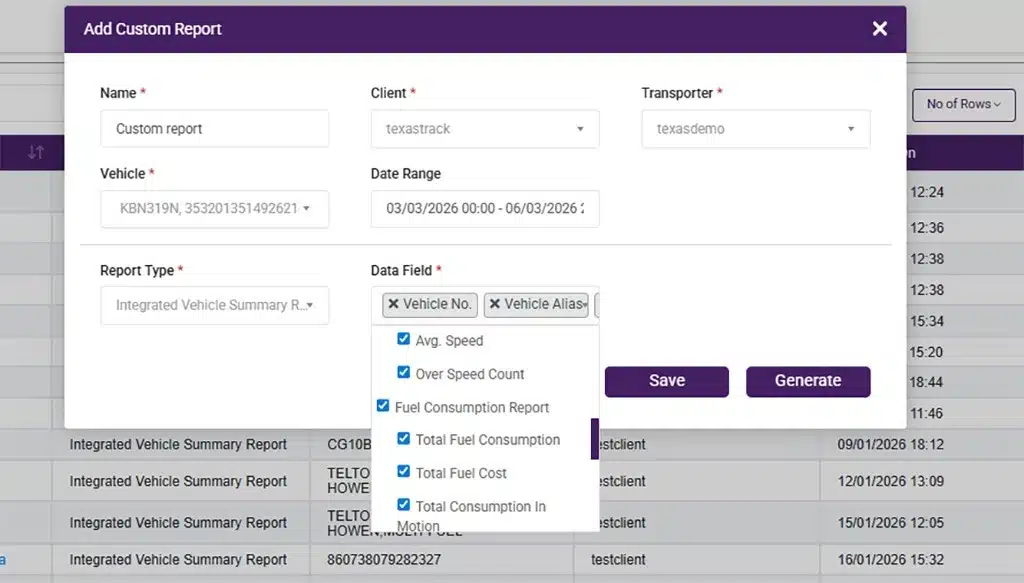
Select the Column Data
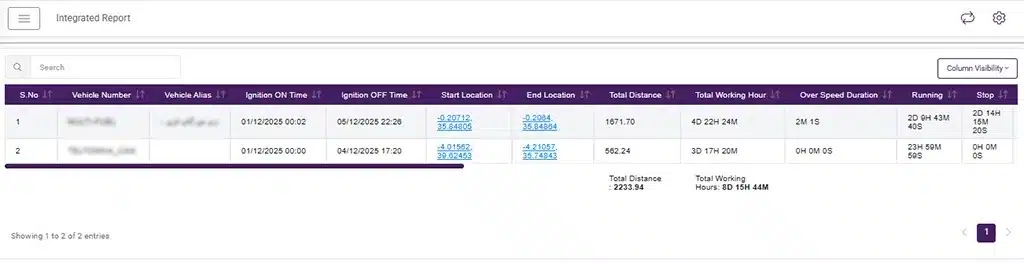
Integrated Report
New Feature 3 – Trip Delay Report
We have introduced a Trip Delay Report under the Trip Reports section to help businesses track and analyze delays during trips.
The report lists all locations where delays occur, including source, halt points, and destination, giving fleets a clear view of where trips are getting delayed. By consolidating delay data into a single report, it becomes easier to identify recurring delay points and operational bottlenecks.
This visibility helps businesses take corrective action and improve trip planning and execution.
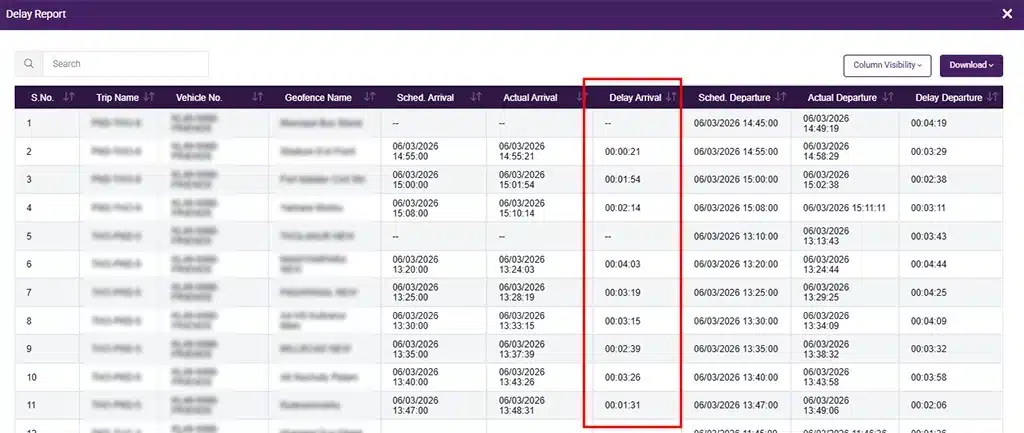
Trip Delay Report
New Feature 4 – Cumulative Excel Export Format for Trip Reports
We have introduced a cumulative Excel export format for Trip Reports to simplify trip data analysis.
Earlier, trip reports were available in only one download format. With this update, users can now download reports in a cumulative format where source, halt, and destination details are available in a single sheet in sequential order.
This makes it easier to review the complete trip flow without navigating across multiple sheets or formats.
Minor Updates and Bug Fixes
1. OTP Grant Access Based Login
A security enhancement has been introduced for OTP Grant Access based login. Now, whenever the OTP Grant Permission setting is modified, all currently logged-in users will be automatically logged out.
This ensures that updated access permissions are applied immediately and strengthens overall account security.
2. Theft Inclusive Average in Fuel Report
A new field has been added to the Fuel Consumption Report to display average fuel consumption, including theft.
This provides fleets with a more comprehensive view of fuel usage by accounting for theft in the average calculation, enabling more accurate fuel analysis and better monitoring of fuel efficiency.
3. Lock Status Filter on Dashboard
A new Lock Status filter has been added to the dashboard to help users quickly view vehicles based on their lock or unlock status.
4. Timezone Update Status Fix
An issue related to the incorrect timezone update status has been resolved, ensuring accurate reflection of timezone updates in the system.
5. Secondary SIM Support in Excel Upload
Secondary SIM details can now be added during vehicle and inventory bulk uploads via Excel. This allows users to include both primary and secondary SIM information while uploading data in bulk, improving data completeness and device configuration.
6. Driver Name Visibility on Dashboard
Driver names are now displayed on the dashboard data table, providing clearer visibility of which driver is assigned to each vehicle.
7. Auto Trip Creation Scheduler Enhancement
Enhancements and modifications have been implemented in the Auto Trip Creation Scheduler, along with additional validation checks.
These updates ensure trips are created more accurately and in line with the defined scheduling rules, improving reliability and control in automated trip creation.
8. Driver Bulk Upload—New Functionality Added
A new Driver Bulk Upload feature has been introduced to simplify driver data management. Users can now upload and create multiple drivers in one go using an Excel file.
This reduces manual effort and helps fleets onboard driver data faster and more efficiently.
9. Scheduler Enhancement – Daily Today KM Update
Enhancements have been made to the Today’s KM calculation scheduler to address specific edge cases that were causing discrepancies in daily distance updates.
This update improves the accuracy of daily Today’s KM calculations, ensuring more reliable distance tracking and preventing error accumulation over time.
10. Vehicle Pull API Update – Additional Fuel Fields Added
New fuel-related data fields have been added to the Vehicle Pull API, including fields for fuel and fuel sum-up data. These additions allow clients to retrieve more detailed fuel information through the API, improving fuel data tracking and integration capabilities.
11. Teltonika IOIDs Support Enhancement
Enhancements have been made to the Teltonika device protocol to support additional IOIDs. These new IOIDs have been incorporated into the Add Sensor module, enabling extended device compatibility and improved sensor data capture.
12. G-18 Device Support – Battery Disconnection Alert
Support has been added for battery disconnection alerts in G-18 devices. This enables timely detection and notification when the device battery is disconnected, improving monitoring and device security.
13. New Device Type Added – Pictor XYZ 1
The Pictor XYZ 1 device is now supported and can be added and used in the system.
Wrapping up
These updates strengthen key areas of the platform and improve everyday workflows. Each enhancement is designed to make the system more reliable, flexible, and easier to use. We will continue bringing regular improvements to help teams get more value from TrackoBit.