TrackoField’s January 2026 release brings strong functional enhancements across Web, Android, and iOS platforms. The update strengthens geo-fence and role-based controls, improves attendance, and boosts reporting accuracy and bulk operations. Approvals are refined, dashboards are faster, and travel preferences are optimized. In this release, our field force management software delivers better control, compliance, and reliability for managers and teams at scale. Ready to see what’s new? Dive into the most impactful updates that make everyday field operations work better. 5 Major Updates to TrackoField in January 2026 Update 1: Dashboard Pagination for Optimized Loading Added dashboard pagination which supports large employee counts with improved search, filter, and performance. Benefit: Better usability and response time with prompt access to data. Update 2: Improved Expense Approval Module Introduced Claim-Wise and Expense Date-Wise filtering. A new Claim Date column, expense-wise approval flow with auto-removal of process records, and better modal headers, labels, and validation messages are other additions. Benefit: Faster expense reviews, clearer approvals, and reduced manual effort for managers. Update 3: Added Mileage Expense ‘View Route’ in Expense Approval Introduced a Mileage Expense View Route feature to help managers verify the actual travel path before approving any mileage claims. Benefit: Improved expense accuracy and lower mileage-related discrepancies. Update 4: Implemented Regularization Window Configuration Added the regularization window configuration to help managers set how many past days (1-28) employees can raise their attendance override request. Benefit: Better control over attendance regularization while preventing misuse or delayed corrections. Update 5: Updated Punch-In/Punch-Out Report The enhanced version now displays attendance type (present/half-day/absent) with a standardized DD/MM/YYYY. This can be done on the web and downloaded on Excel. Benefit: Clear attendance records and consistent reporting. It helps with easier reviews and audits. Notable Updates to TrackoField in Web: Version 17.5.0. 1-47 Update 1: Added Role-Based Permission Role-based control to allow or restrict managers from applying leaves and attendance overrides on behalf of employees. This replaces company-level settings. Benefit: Granular access control with better governance and reduced misuse. Update 2: Updated Attendance Override Request and History Pages The page now displays Employee Name, Employee Username, Reporting Manager Name, and Username. This comes with full manage-column and export support. Benefit: Faster reviews, clearer accountability, and easier reporting with complete, export-ready data. Update 3: Introduced a Reports Section This has been updated under the Roles & Permission for Executives for limited access control in distance-related reports. Benefit: Executives only see the distance metrics that are relevant to their decisions. This reduces noise and protects sensitive data. Update 4: Moved Travel Preference Configuration It has been moved from Company Profile to FO Settings. This allows selective enforcement at the FO Level. Benefit: Gives teams finer control over travel rules without impacting the entire organization. Update 5: Added Bulk Upload Support for FO Settings This is done along with travel preferences along with dynamic instructions. Benefit: Reduces manual set up time and minimizes configuration errors at scale. Update 6: Removed Geo-Fence Auto-Deletion Logic This has been done from task APIs to avoid unintended geofence removals. Benefit: Improves data reliability by preventing accidental loss of geofence configurations. Update 7: Multiple Technical Enhancements Backend queries have been optimized across Dashboards, Reports, Geofence, and Employee Summary for better index usage and scalability. Benefit: Delivers faster load times and improved performance as data volume grows. Update 8: Miscellaneous Updates Enhanced bulk actions, API validations, and system scripts to improve overall data consistency and system stability. Benefit: Ensures cleaner data handling and more predictable system behavior. Notable Updates to TrackoField in Android: V2.35 Update 1: Enabled Role-Based Leaves and Override Controls Leave and attendance override permissions based on roles. These are fully aligned with existing Web logic. Benefit: Ensures consistent access control and prevents unauthorized overrides. Update 2: Expense Date Visibility in Reports Added an Expense Date field to expense reports and Excel exports, supported by clear tooltips for context. Benefit: Improves expense traceability and audit readiness. Update 3: Implemented Attendance Regularization Window Enforcement A defined time window for submitting attendance override and regularization requests. Benefit: Reduces backdated corrections and strengthens attendance discipline. Update 4: Flexible Expense Approval Limits Introduced support for partial or more expense approvals when the setting is enabled. Benefit: Supports fair reimbursements in exceptional or adjusted cases. Update 5: Regulated Travel and Odometer Controls via FO Settings Regulated Mode of Travel, Odometer Reading, and Odometer Image capture through FO Settings for better configurability. Benefit: Ensures uniform travel validation across field operations. Update 6: Added Loader for Stale Location Data Added a loader to avoid crashes during attendance or task actions. Benefit: Delivers a smoother and more dependable user experience. Update 7: Performance and Reliability Enhancements Improved dashboard performance, report visibility, and reliability of background executions across the system. Benefit: Delivers a faster, more dependable experience at scale while reducing disruptions. Notable Updates to TrackoField in iOS: V2.35 Update 1: Cross-Platform Role-Based Leave Controls Enabled role-based Leave and Override permissions, aligned across Web and Android platforms. Benefit: Ensures consistent access control and reduces policy mismatches across devices. Update 2: Expense Dates in Reports and Exports Added the Expense Date field to reports and Excel downloads for clearer expense timelines. Benefit: Improves the reporting accuracy and audit readiness. Update 3: Attendance Regularization Window Enforcement Applied strict Regularization Window rules for attendance override requests. Benefit: Prevents excessive backdated changes and improves attendance compliance. Update 4: Flexible Expense Approval Flow Implemented support for partial or higher-than-claimed expense approvals. Benefit: Allows managers to resolve exceptions without reopening expense submissions. Update 5: Travel & Odometer Controls via FO Settings Regulated Mode of Travel and Odometer-related controls through FO Settings. Benefit: Ensure consistent travel validation across field operations while reducing manual checks and policy deviations. Looking Forward This release focuses on stronger controls, clearer workflows, and more reliable platform experience. With finer configuration at the module level, improved visibility for managers, and meaningful performance and stability upgrades across Web and Android, teams can now operate with greater accuracy, governance, and confidence at scale. In the coming months, we’ll be introducing Territory Management and Center Management to help you structure field operations with clearer regional ownership and control. Keep an eye here. More details are coming soon.
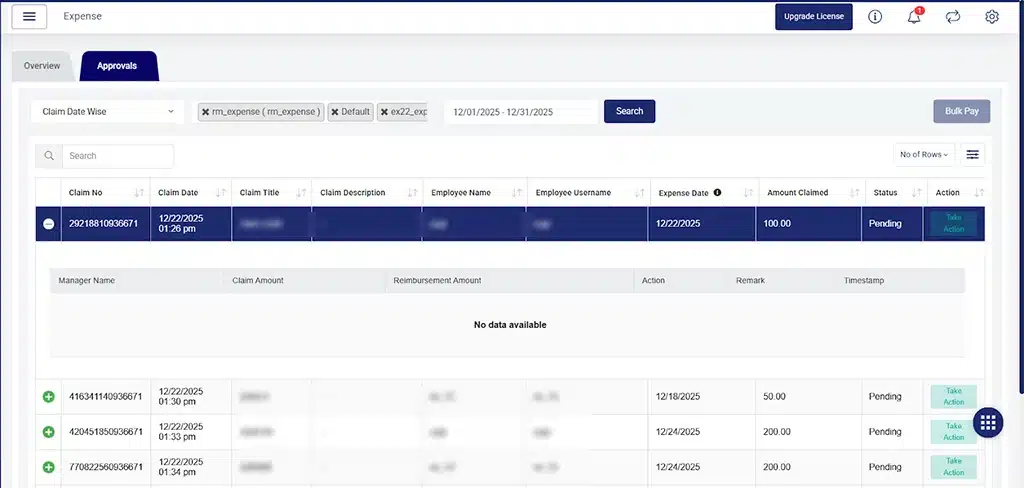
TrackoField’s January 2026 release brings strong functional enhancements across Web, Android, and iOS platforms. The update strengthens geo-fence and role-based controls, improves attendance, and boosts reporting accuracy and bulk operations. Approvals are refined, dashboards are faster, and travel preferences are optimized.

In this release, our field force management software delivers better control, compliance, and reliability for managers and teams at scale.

Ready to see what’s new? Dive into the most impactful updates that make everyday field operations work better.

5 Major Updates to TrackoField in January 2026

Update 1: Dashboard Pagination for Optimized Loading

Added dashboard pagination which supports large employee counts with improved search, filter, and performance.

Benefit: Better usability and response time with prompt access to data.

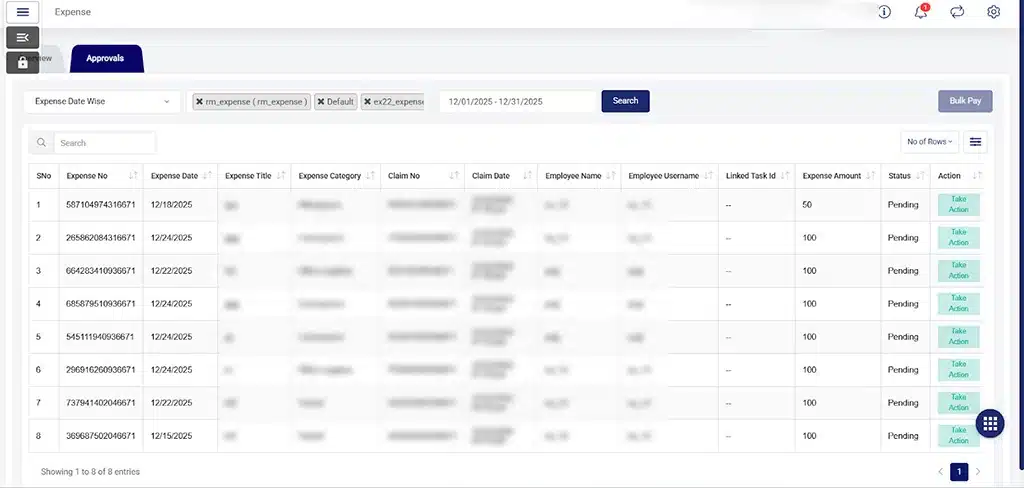
Update 2: Improved Expense Approval Module

Introduced Claim-Wise and Expense Date-Wise filtering. A new Claim Date column, expense-wise approval flow with auto-removal of process records, and better modal headers, labels, and validation messages are other additions.

Benefit: Faster expense reviews, clearer approvals, and reduced manual effort for managers.
Improved Expense Approval Module


Improved Expense Approval Module

Improved Expense Approval Module

Update 3:  Added Mileage Expense ‘View Route’ in Expense Approval

Introduced a Mileage Expense View Route feature to help managers verify the actual travel path before approving any mileage claims.

Benefit: Improved expense accuracy and lower mileage-related discrepancies.
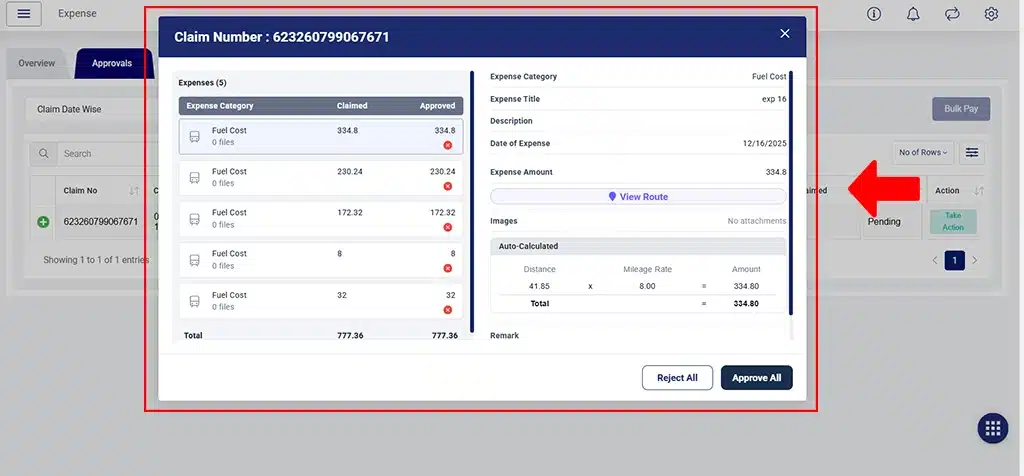
Mileage Expense View Route


Mileage Expense View Route

Mileage Expense View Route

Update 4: Implemented Regularization Window Configuration

Added the regularization window configuration to help managers set how many past days (1-28) employees can raise their attendance override request.

Benefit: Better control over attendance regularization while preventing misuse or delayed corrections.

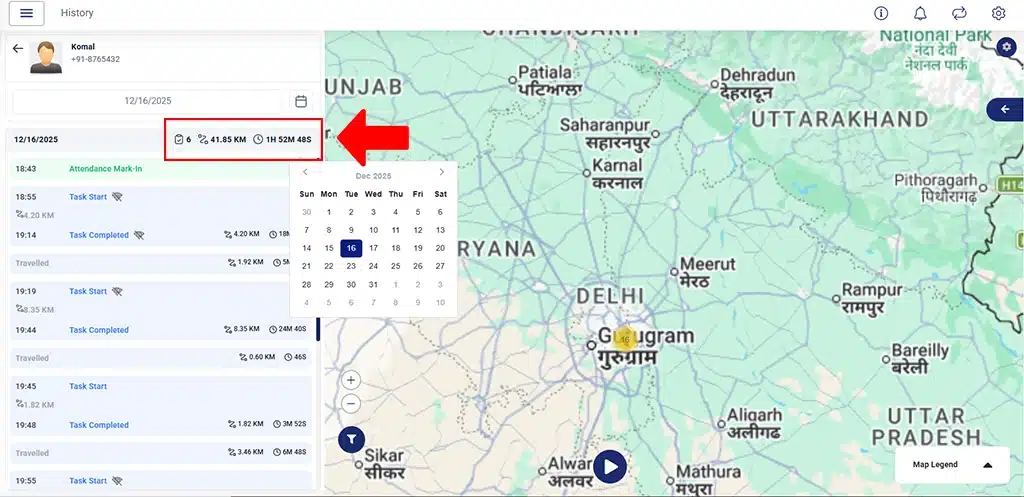
Update 5: Updated Punch-In/Punch-Out Report

The enhanced version now displays attendance type (present/half-day/absent) with a standardized DD/MM/YYYY. This can be done on the web and downloaded on Excel.

Benefit: Clear attendance records and consistent reporting. It helps with easier reviews and audits.
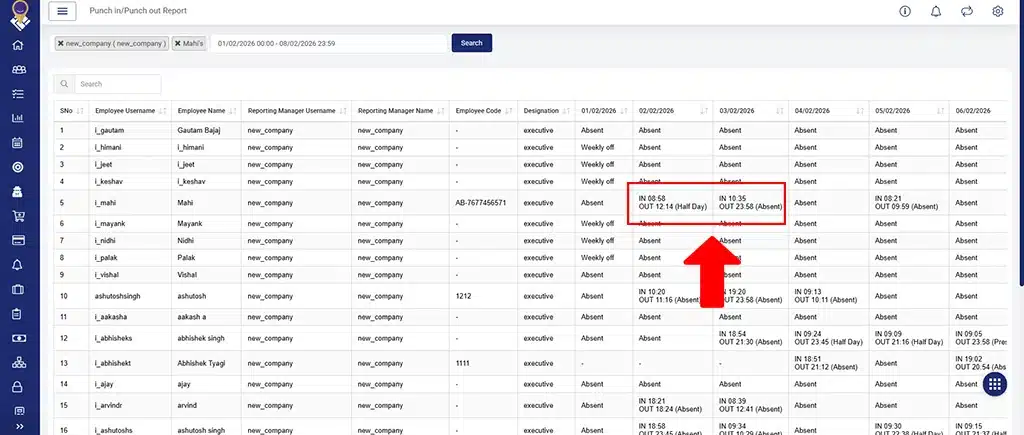
Attendance Type Displayed

Attendance Type Displayed

Notable Updates to TrackoField in Web: Version 17.5.0. 1-47

Update 1: Added Role-Based Permission

Role-based control to allow or restrict managers from applying leaves and attendance overrides on behalf of employees. This replaces company-level settings.

Benefit: Granular access control with better governance and reduced misuse.

Update 2: Updated Attendance Override Request and History Pages

The page now displays Employee Name, Employee Username, Reporting Manager Name, and Username. This comes with full manage-column and export support.

Benefit: Faster reviews, clearer accountability, and easier reporting with complete, export-ready data.

Update 3: Introduced a Reports Section

This has been updated under the Roles & Permission for Executives for limited access control in distance-related reports.

Benefit: Executives only see the distance metrics that are relevant to their decisions. This reduces noise and protects sensitive data.

Update 4:  Moved Travel Preference Configuration

It has been moved from Company Profile to FO Settings. This allows selective enforcement at the FO Level.

Benefit: Gives teams finer control over travel rules without impacting the entire organization.

Update 5: Added Bulk Upload Support for FO Settings

This is done along with travel preferences along with dynamic instructions.

Benefit: Reduces manual set up time and minimizes configuration errors at scale.

Update 6: Removed Geo-Fence Auto-Deletion Logic

This has been done from task APIs to avoid unintended geofence removals.

Benefit: Improves data reliability by preventing accidental loss of geofence configurations.

Update 7: Multiple Technical Enhancements

Backend queries have been optimized across Dashboards, Reports, Geofence, and Employee Summary for better index usage and scalability.

Benefit: Delivers faster load times and improved performance as data volume grows.

Update 8: Miscellaneous Updates

Enhanced bulk actions, API validations, and system scripts to improve overall data consistency and system stability.

Benefit: Ensures cleaner data handling and more predictable system behavior.

Notable Updates to TrackoField in Android: V2.35

Update 1: Enabled Role-Based Leaves and Override Controls

Leave and attendance override permissions based on roles. These are fully aligned with existing Web logic.

Benefit: Ensures consistent access control and prevents unauthorized overrides.

Update 2: Expense Date Visibility in Reports

Added an Expense Date field to expense reports and Excel exports, supported by clear tooltips for context.

Benefit: Improves expense traceability and audit readiness.

Update 3: Implemented Attendance Regularization Window Enforcement

A defined time window for submitting attendance override and regularization requests.

Benefit: Reduces backdated corrections and strengthens attendance discipline.

Update 4: Flexible Expense Approval Limits

Introduced support for partial or more expense approvals when the setting is enabled.

Benefit: Supports fair reimbursements in exceptional or adjusted cases.

Update 5: Regulated Travel and Odometer Controls via FO Settings

Regulated Mode of Travel, Odometer Reading, and Odometer Image capture through FO Settings for better configurability.

Benefit: Ensures uniform travel validation across field operations.

Update 6: Added Loader for Stale Location Data

Added a loader to avoid crashes during attendance or task actions.

Benefit: Delivers a smoother and more dependable user experience.

Update 7: Performance and Reliability Enhancements

Improved dashboard performance, report visibility, and reliability of background executions across the system.

Benefit: Delivers a faster, more dependable experience at scale while reducing disruptions.

Notable Updates to TrackoField in iOS: V2.35

Update 1: Cross-Platform Role-Based Leave Controls

Enabled role-based Leave and Override permissions, aligned across Web and Android platforms.

Benefit: Ensures consistent access control and reduces policy mismatches across devices.

Update 2: Expense Dates in Reports and Exports

Added the Expense Date field to reports and Excel downloads for clearer expense timelines.

Benefit: Improves the reporting accuracy and audit readiness.

Update 3: Attendance Regularization Window Enforcement

Applied strict Regularization Window rules for attendance override requests.

Benefit: Prevents excessive backdated changes and improves attendance compliance.

Update 4: Flexible Expense Approval Flow

Implemented support for partial or higher-than-claimed expense approvals.

Benefit: Allows managers to resolve exceptions without reopening expense submissions.

Update 5: Travel & Odometer Controls via FO Settings

Regulated Mode of Travel and Odometer-related controls through FO Settings.

Benefit: Ensure consistent travel validation across field operations while reducing manual checks and policy deviations.

Looking Forward

This release focuses on stronger controls, clearer workflows, and more reliable platform experience. With finer configuration at the module level, improved visibility for managers, and meaningful performance and stability upgrades across Web and Android, teams can now operate with greater accuracy, governance, and confidence at scale.

In the coming months, we’ll be introducing Territory Management and Center Management to help you structure field operations with clearer regional ownership and control.

Keep an eye here. More details are coming soon.