
January 2026 marks a significant step forward for TrackoBit. This release introduces upgrades to video telematics, smarter alerting, and automated geofence based trip reporting.
These updates help teams gain sharper visibility and faster control over operations. Alongside the major enhancements, multiple refinements across web and mobile improve accuracy, usability, and day to day efficiency for fleet and operations teams.
Major Updates in TrackoBit’s Web App for January 2026
Update 1: Video Telematics Capability Expansion
This January, TrackoBit’s Video Telematics is upgraded to deliver deeper coverage, faster investigations, and better control over vehicle video data. This is applicable on both web and mobile app.
What got updated
- Up to 8-Channel Camera Support
Move beyond 2 cameras. Track up to 8 camera feeds per vehicle with live streaming and playback, giving complete visibility inside and around the vehicle.
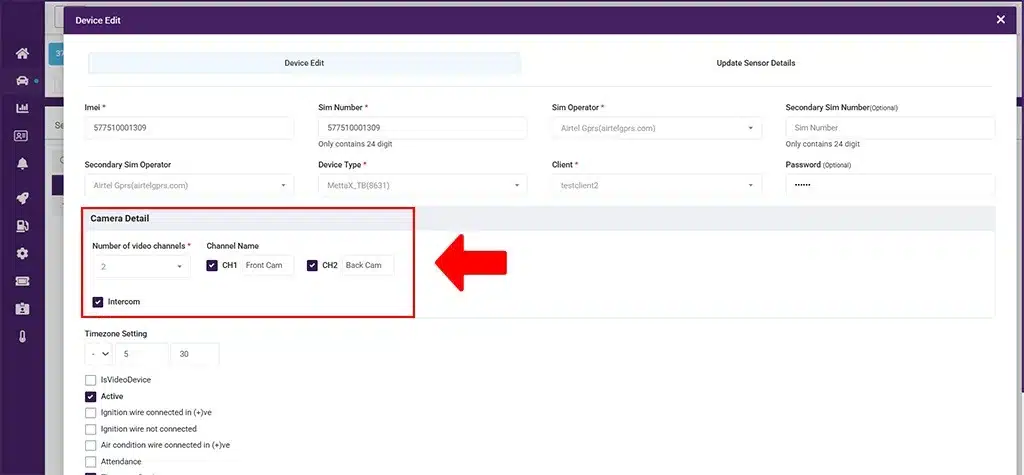
Get video feed from up to 8 cameras
- Custom Camera Naming
Label each feed clearly – in-cabin, rear, backdoor, side – so teams know exactly what they’re viewing, without guesswork.
- Playback Timeline Graph
Playback now includes a visual timeline graph with a full 24-hour view, making it easier to quickly locate incidents and review footage without manual scanning.
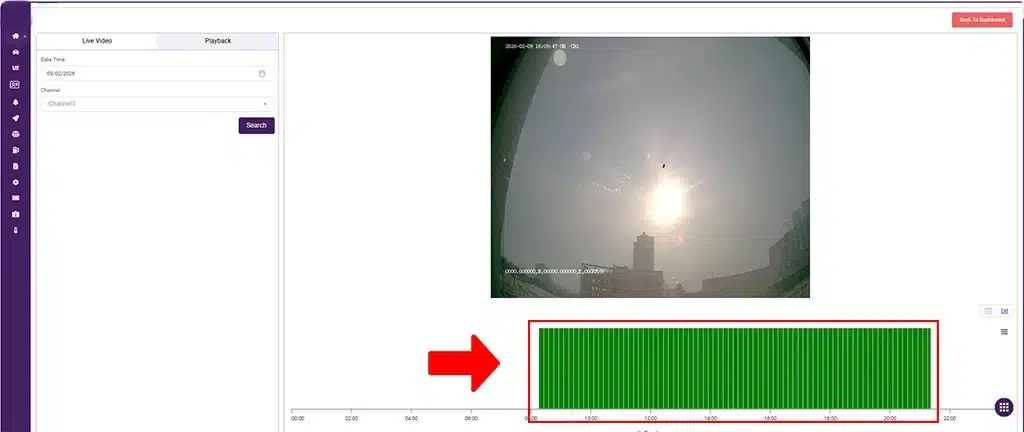
Video telematics play back graph
- Video Playback Download
Download require video clips directly from playback for audits, training, or evidence. - Advanced Camera Settings
Configure camera settings directly from the Vehicle Page with enhanced multichannel management for smoother operations.
Benefits:
- Complete visibility across vehicles
- Faster incident resolution
- Clear camera identification
- Instant access to video evidence
- Centralized camera control
Update 2: Custom Alerts
Custom Alerts introduce a flexible, rule-based alerting system that allows businesses to monitor any sensor data and respond to events that matter most to their operations.
This enhancement gives teams complete control over what to track, when to trigger alerts, and how notifications are delivered. This makes monitoring more proactive and actionable.
What’s new
- Alert Creation on Any Sensor Data
Create alerts using data from any connected sensor, tailored to specific operational or business use cases. - Configurable Alert Logic
Define alert conditions with clear rules and validations to ensure alerts trigger only when thresholds are truly breached. - Custom Alert Naming & Templates
Name alerts meaningfully and configure templates to standardize communication across teams - Multi-Channel Notifications
Receive alerts via Email, SMS, WhatsApp, Telegram, or push notifications, ensuring critical updates are never missed.
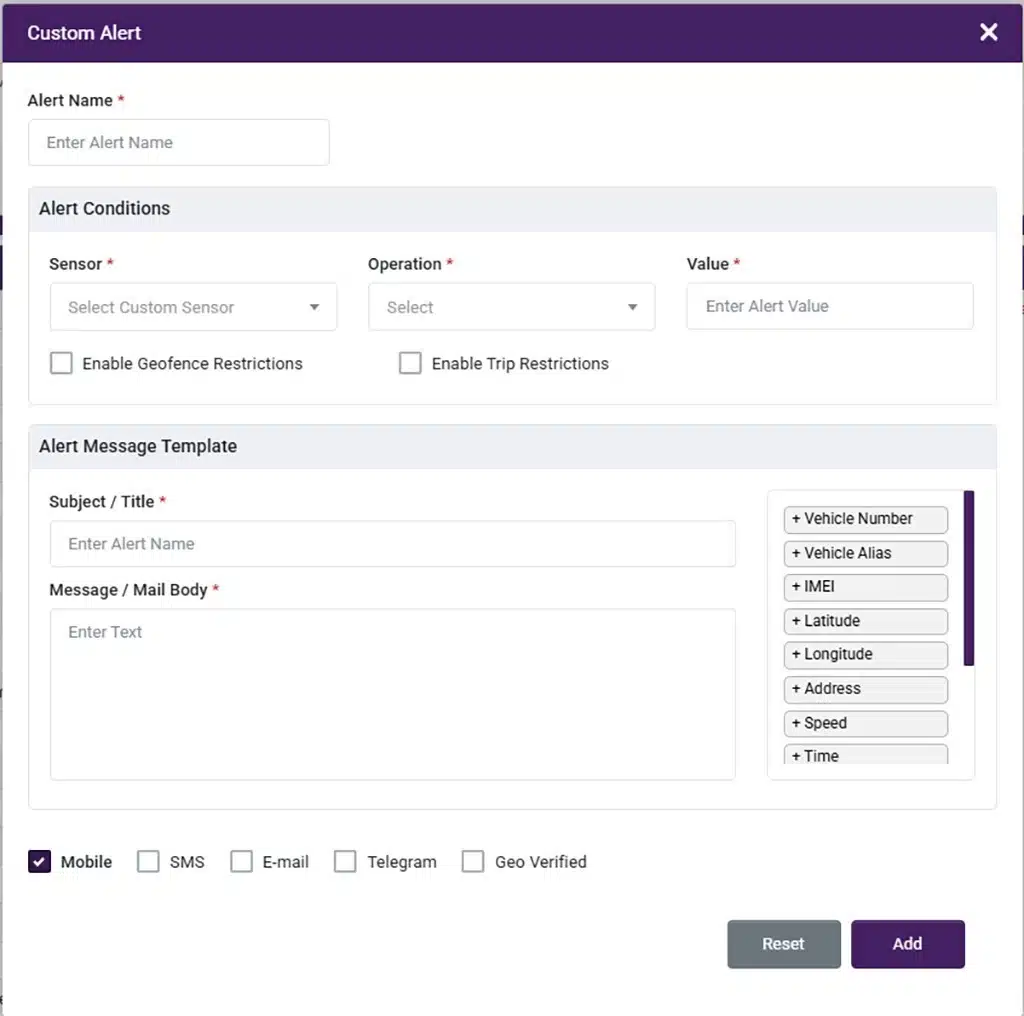
Custom alerts from sensor data
Update 3: Geofence-Based Trip Reporting
The Geofence Trip Report introduces an automated, trip-level view based entirely on geofence exit and entry events.
What’s new
- Automatic Trip Creation
Trips start the moment a vehicle exits a geofence and end upon entry into another, with no manual input required. - Trip-Level Visibility
View each geofence-to-geofence trip with clear insights into distance travelled and movement history. - Playback History Access
Replay trip routes to review vehicle movement and validate routes taken. - Better Operational Analysis
Use distance and playback data to assess route efficiency and deviations.
Minor Updates and Bug Fixes
1. Expense Report – Delete Option
Users can now delete entries within the Expense Report. This helps correct errors easily and keeps expense data clean and accurate without additional support intervention.
2. Inventory Module – Secondary SIM Support
The Inventory module now supports Secondary SIMs, allowing better tracking and management of multi-SIM devices. This improves inventory accuracy and reduces dependency on manual records.
3. POI-Based Geofence Creation
Users can now create geofences directly using Points of Interest (POIs). Geofence creation is no longer limited to circular shapes. Users can now define circular, polygon, or rectangular geofences, offering greater flexibility and more accurate area coverage.
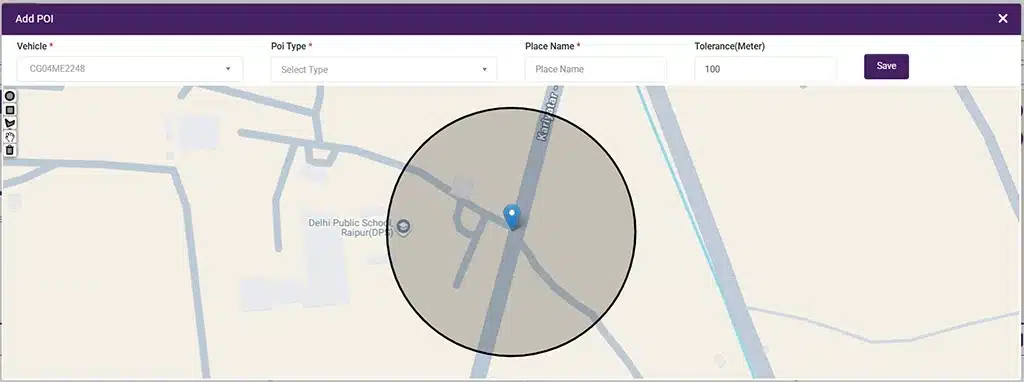
POI geofence creation
4. MP Excise API Integration
Implemented the MP Excise Trip API integration. This enables seamless trip data exchange and supports compliance with MP Excise tracking and reporting requirements.
5. Trip Scheduling – Full Minute Selection
Trip scheduling now allows full minute selection (00–59) for both departure and arrival times. This removes the earlier 15-minute restriction and enables more precise scheduling for improved planning accuracy.
6. New Web Theme Implementation
A new UI theme, Imperial Red (#800200), has been introduced to refresh the platform’s look and feel. This is introduced across the web and mobile app.
7. Vehicle Playback – Trip Report Enhancement
Trip report playback within vehicle playback has been improved for better accuracy and usability. Issues related to the trip report summary view have been resolved, making trip analysis clearer and more reliable.
8. Bulk Upload – Trip Validation
Bulk trip creation is now supported with added validations. These checks help reduce inaccuracies during upload and ensure cleaner, more reliable trip data.
9. Vehicle Number in Reports (Temperature & Fuel)
A Vehicle Number column has been added to both Temperature and Fuel Consumption reports. This improves report clarity, traceability, and simplifies analysis across multiple vehicles.
10. Sensor Data Import Stability Fix
Sensor import issues have been resolved, preventing duplicate entries and unintended deletions to ensure accurate and stable sensor records.
11. New Device Support
Enhanced Prime09 device handling to improve communication stability and data reliability. Added support for HL-TECH-BR_SERIES and TK903 (8502) devices for seamless integration.
12. Fuel Cost Configuration by Vehicle and Fuel Type
Fuel cost is now calculated based on both vehicle type and fuel type. Each vehicle can be configured with the correct fuel and cost, ensuring accurate fuel expense reporting across mixed fleets. This is supported via bulk vehicle upload and reflected in Fuel and Fuel Chart Reports.
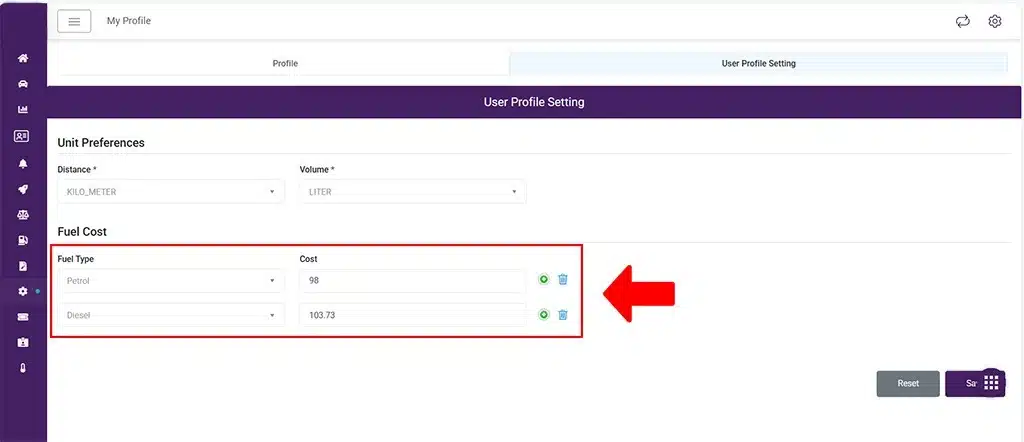
Assign fuel type and cost
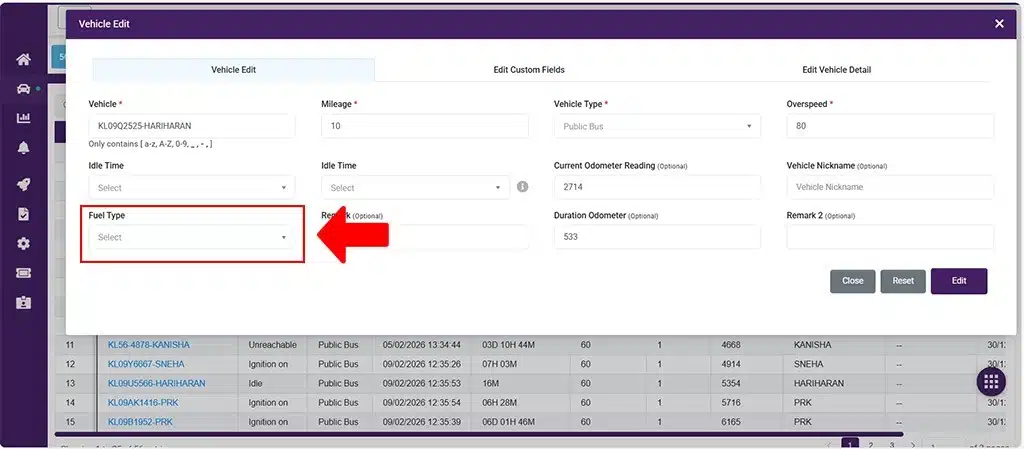
Fuel type
What’s New in Android?
-
Optimized PDF & Excel Reports
Report generation for PDF and Excel has been optimized on the Android app, resulting in faster downloads and improved performance.
-
New POI Types Added
New POI types—Supermarket, Attendance, and Shop—have been added to provide greater flexibility in categorizing and managing Points of Interest (POIs).
Looking Forward
With these updates, TrackoBit continues to evolve into a more robust and dependable operations platform. The January 2026 release focuses on reducing manual effort, improving data accuracy, and enabling quicker decision-making.
Together, these enhancements support more efficient monitoring and smoother workflows. They also help deliver stronger operational outcomes across diverse business use cases. Keep an eye here for more exciting updates in the coming months.